3-Newcomer
June 17, 2022
Solved

how to add padding for legend in linechart

  • June 17, 2022
  • 1 reply
  • 1039 views

I would like to add padding to the legend in linechart by adding custom CSS but unable to add it.

 

Best answer by abjain

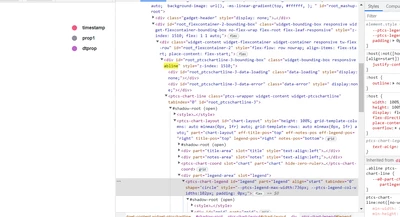
@JB_10252176 : If you give a CustomClass property for line chart lets say: 'abline' , then you can apply custom CSS till the selected div in below screenshot.

abjain_0-1655706313965.png


We cannot go inside the highlighted div and add custom CSS for individual legends as they will be at sub-part "item" . So you can give custom CSS like this:

.abline ptcs-chart-line::part(chart-layout)::part(legend){
padding:200px
}

This will apply padding to the whole legends area in the line chart.


1 reply

abjain15-MoonstoneAnswer
15-Moonstone
June 20, 2022

@JB_10252176 : If you give a CustomClass property for line chart lets say: 'abline' , then you can apply custom CSS till the selected div in below screenshot.

abjain_0-1655706313965.png


We cannot go inside the highlighted div and add custom CSS for individual legends as they will be at sub-part "item" . So you can give custom CSS like this:

.abline ptcs-chart-line::part(chart-layout)::part(legend){
padding:200px
}

This will apply padding to the whole legends area in the line chart.