11-Garnet
November 15, 2023
Solved

How to apply aggregate functions on grid data

  • November 15, 2023
  • 1 reply
  • 16960 views

Hi all,


I have a doubt like suppose I  have some grid data for example suppose I have 3 column having column attribute like ID, Name and Type now I want to do some calculation on top of grid data like I want to show their number in percentage format.


For more detailed info I am attaching an image file

please help me 


Regards,

Rayon.
Best answer by Arun_C

Hi @Rayon_11 ,


Kindly find the below code it may helps you.

let params = {
 t: InputData /* INFOTABLE */,
 columns: "Type" /* STRING */,
 aggregates: "COUNT" /* STRING */,
 groupByColumns: "Type" /* STRING */,
};

let AggregateData = Resources["InfoTableFunctions"].Aggregate(params);
var totalInfoLength = InputData.rows.length;

for (var a = 0; a < AggregateData.rows.length; a++) {
 var countType = AggregateData.rows[a].COUNT_Type;
 var typeName = AggregateData.rows[a].Type;
 var calculatedPercentage = ((countType / totalInfoLength) * 100).toFixed(0);
 
 for (var i = 0; i < InputData.rows.length; i++) {
 if (InputData.rows[i].Type === typeName) {
 InputData.rows[i].Percentage_Type = calculatedPercentage;
 InputData.rows[i].Category = typeName;
 break; 
 }
 }
}
result = InputData;

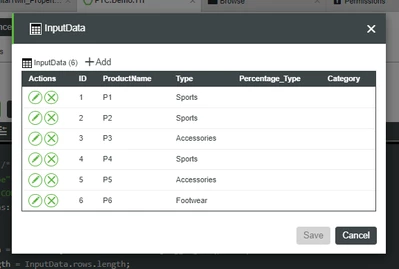
Input : 

Arun_C_1-1700039848740.png


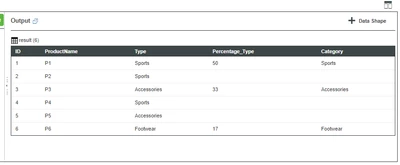
Output : 

Arun_C_0-1700039822779.png

If any other queries please let me know.


Thanks & Regards,

Arun C

1 reply

Arun_C16-PearlAnswer
16-Pearl
November 15, 2023

Hi @Rayon_11 ,


Kindly find the below code it may helps you.

let params = {
 t: InputData /* INFOTABLE */,
 columns: "Type" /* STRING */,
 aggregates: "COUNT" /* STRING */,
 groupByColumns: "Type" /* STRING */,
};

let AggregateData = Resources["InfoTableFunctions"].Aggregate(params);
var totalInfoLength = InputData.rows.length;

for (var a = 0; a < AggregateData.rows.length; a++) {
 var countType = AggregateData.rows[a].COUNT_Type;
 var typeName = AggregateData.rows[a].Type;
 var calculatedPercentage = ((countType / totalInfoLength) * 100).toFixed(0);
 
 for (var i = 0; i < InputData.rows.length; i++) {
 if (InputData.rows[i].Type === typeName) {
 InputData.rows[i].Percentage_Type = calculatedPercentage;
 InputData.rows[i].Category = typeName;
 break; 
 }
 }
}
result = InputData;

Input : 

Arun_C_1-1700039848740.png


Output : 

Arun_C_0-1700039822779.png

If any other queries please let me know.


Thanks & Regards,

Arun C

Rayon_1111-GarnetAuthor
11-Garnet
November 15, 2023

Hi Arun,

 I did try with the code you provided just changed the Infotable name as I have set it to GridData but I am getiing error like


Error executing service TestAggregate. Message :: ReferenceError: "GridData" is not defined. - See Script Error Log for more detail


And my code is like:


let params = {
t: GridData /* INFOTABLE */,
columns: "Type" /* STRING */,
aggregates: "COUNT" /* STRING */,
groupByColumns: "Type" /* STRING */,
};

let AggregateData = Resources["InfoTableFunctions"].Aggregate(params);
var totalInfoLength = GridData.rows.length;

for (var a = 0; a < AggregateData.rows.length; a++) {
var countType = AggregateData.rows[a].COUNT_Type;
var typeName = AggregateData.rows[a].Type;
var calculatedPercentage = ((countType / totalInfoLength) * 100).toFixed(0);

for (var i = 0; i < GridData.rows.length; i++) {
if (GridData.rows[i].Type === typeName) {
GridData.rows[i].Percentage_Type = calculatedPercentage;
GridData.rows[i].Category = typeName;
break;
}
}
}
result = GridData;


please let me know what changes I have to do 


Regards,

Rayon.


16-Pearl
November 15, 2023

Hi @Rayon_11 ,


In my example InputData is a variable which I have declared in Service's Input as Infotable parameter. It act as source of Data. (Find the Input image section which I have already attached) 

Arun_C_0-1700047308260.png


In your case please get your source data in the variable of GridData or Create it in your service input based on your requirement.


Thanks &Regards,

Arun C