11-Garnet
July 11, 2022
Solved

How to bind infotable to tree widget in thingworx

  • July 11, 2022
  • 1 reply
  • 1043 views

I want to create a hierarchy structure, i have all the data in infotable,  is it possible to bind an infotable to tree widget in ThingWorx. Which services we need to user for this activity.

Thanks.


Best answer by eliotlandrum

Hello, yes! The structure of the InfoTable needs to be so that each node (which will be a row in the InfoTable), has its parent node in a second column. The Tree Widget will build it out of that.


For example:


nodeNameparentNode
World 
EuropeWorld
GermanyEurope
MunichGermany
SwitzerlandEurope
North AmericaWorld
USANorth America


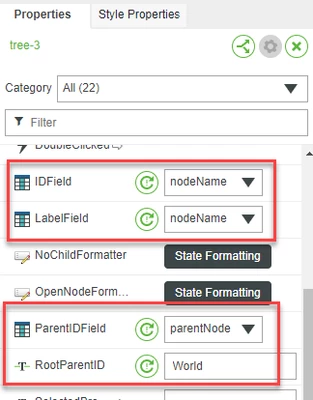
You can drag the InfoTable output from any service that returns the InfoTable to the Tree Widget, then you need to select the columns for the Node and Parent, and specify what the top level node is (in my example, it is "World").  The names of the columns can be whatever you need them to be.
 

eliotlandrum_0-1657567843890.png


Hope that helps!

1 reply

14-Alexandrite
July 11, 2022

Hello, yes! The structure of the InfoTable needs to be so that each node (which will be a row in the InfoTable), has its parent node in a second column. The Tree Widget will build it out of that.


For example:


nodeNameparentNode
World 
EuropeWorld
GermanyEurope
MunichGermany
SwitzerlandEurope
North AmericaWorld
USANorth America


You can drag the InfoTable output from any service that returns the InfoTable to the Tree Widget, then you need to select the columns for the Node and Parent, and specify what the top level node is (in my example, it is "World").  The names of the columns can be whatever you need them to be.


eliotlandrum_0-1657567843890.png


Hope that helps!
