10-Marble
April 14, 2023
Solved

How to change Grid Advanced widget text font to some external font

  • April 14, 2023
  • 2 replies
  • 1329 views

I have a new font that i want to set to rows text of my gridAdvanced widget,
"font-family": ["ZCOOL QingKe HuangYou", "cursive"]


I tried the css and grid configuration, may be somewhere i am getting wrong.

css is working for labels, but how shall i write css for grid rows font?
Can anyone please try this and help me set this font to my Grid Row Text?


In Thingworx composer I am using GridAdvanced widget.

in the screenshot below, 
Left side is Grid-Advanced widget, & Right side Zeros(0) are label widgets.
I need the font of GridAdvaced Text ( 1       0 ) to be the same as label font.

GP_10261285_0-1681468781425.png


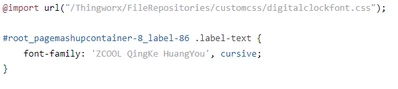
For label I am using following css.

GP_10261285_1-1681468781407.png

Please try it for grid advanced widget in thingworx, and let me know if anything works for it.


Thanks in advance.


Best answer by Rocky_2021

This is solved by finding the widget class / ID from runtime mashup and applying the css to it directly once the font is imported as .css file in FileRepository.

for example , in my case I use the following css code:

@import("/Thingworx/FileRepositories/customcss/digitalclockfont.css");

#root_pagemashupcontainer-8_gridadvanced-96-grid-advanced .objbox table btody tr td {font family: 'Zcool Qingke HaungYou',cursive;}


and this code is pasted in "custom css" of that mashup.

& wohoo that worked .. !

2 replies

17-Peridot
April 14, 2023

Hello @Rocky_2021 ,


The following custom CSS seems to work fine, although it doesn't change the header font.

@supports (ptcs-style-unit: "PTCS-CORE-GRID") {
 [part~="cell-label"] {
 font-family: 'yourFontFamilyHere';
 }
}

However I think this will target ALL grids, so be careful with how you use it.


To change the header font you might be able to use [part~="header-label"].

A good consideration is also that PTC does not recommend using custom CSS.


Regards,

Jens

Rocky_202110-MarbleAuthorAnswer
10-Marble
April 17, 2023

This is solved by finding the widget class / ID from runtime mashup and applying the css to it directly once the font is imported as .css file in FileRepository.

for example , in my case I use the following css code:

@import("/Thingworx/FileRepositories/customcss/digitalclockfont.css");

#root_pagemashupcontainer-8_gridadvanced-96-grid-advanced .objbox table btody tr td {font family: 'Zcool Qingke HaungYou',cursive;}


and this code is pasted in "custom css" of that mashup.

& wohoo that worked .. !