

Question
How to change segment colors of d3 pie chart
I am trying to match the colors in the label chart widget by changing the segment colors in the d3 pie chart widget.
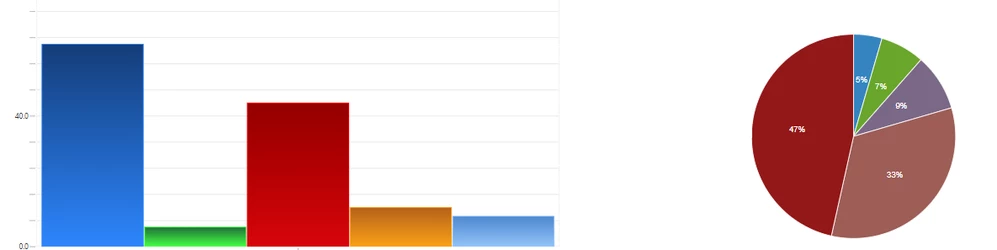
The d3 pie chart can be downloaded from the following link:
https://community.ptc.com/t5/ThingWorx-Developers/label-above-pie-chart/m-p/540169
To change the segment colors, I followed the instructions provided by d3pie in the following link:
http://d3pie.org/website/examples/colors.html
I changed lines 127 to 132 in d3pie.min.js:
Before:
 misc: {
 colors: {
 background: null,
 segments: ["#0086ff", "#1bff31", "#de0e0e", "#ffa100", "#8dc3fa", "#6b6b6b", "#cbcbcb", "#ebebeb", "#ff13f2", "#a08965", "#7c0071", "#7cd685", "#ede2be", "#32ffff", "#ffee33", "#ffcdf3", "#bc0000", "#c58937", "#e1d04d", "#a6cd44", "#43a4c9", "#da5f5f", "#a4cba5", "#4f3ebe", "#2484c1", "#65a620", "#7b6888", "#a05d56", "#961a1a", "#d8d23a", "#e98125", "#d0743c", "#635222", "#6ada6a", "#0c6197", "#7d9058", "#207f33", "#44b9b0", "#bca44a", "#e4a14b", "#a3acb2", "#8cc3e9", "#69a6f9", "#5b388f", "#546e91", "#8bde95", "#d2ab58", "#273c71", "#98bf6e", "#4daa4b"],
 segmentStroke: "#ffffff"
 },
After:
 misc: {
 colors: {
 background: null,
 segments: ["#2484c1", "#65a620", "#7b6888", "#a05d56", "#961a1a", "#d8d23a", "#e98125", "#d0743c", "#635222", "#6ada6a", "#0c6197", "#7d9058", "#207f33", "#44b9b0", "#bca44a", "#e4a14b", "#a3acb2", "#8cc3e9", "#69a6f9", "#5b388f", "#546e91", "#8bde95", "#d2ab58", "#273c71", "#98bf6e", "#4daa4b", "#98abc5", "#cc1010", "#31383b", "#006391", "#c2643f", "#b0a474", "#a5a39c", "#a9c2bc", "#22af8c", "#7fcecf", "#987ac6", "#3d3b87", "#b77b1c", "#c9c2b6", "#807ece", "#8db27c", "#be66a2", "#9ed3c6", "#00644b", "#005064", "#77979f", "#77e079", "#9c73ab", "#1f79a7"],
 segmentStroke: "#ffffff"
 },
However, after the change, it is still displaying the old colors. Is the extension not referencing these color codes anymore?