
1-Visitor
February 6, 2018
Question

How to change "Selected Row(s)" of InfoTable by code

  • February 6, 2018
  • 3 replies
  • 3786 views

Hi,

I have an InfoTable (called from GetProperties()-service) with only one row. Now I will bind the properties of this InfoTable to Textbox's on my mashup. Problem: I can only bind the properties of the "Selected Row(s)" to the mashup elements.
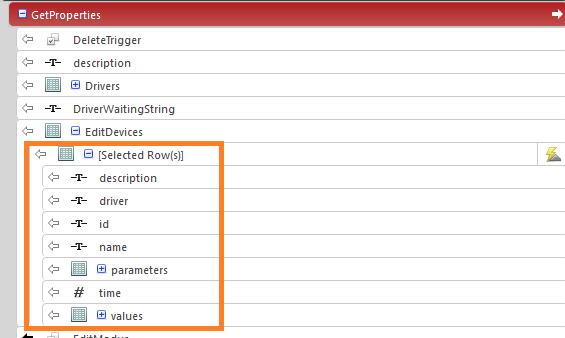
So my idea, I set the "Selected Row(s)" to the first row, but how? Have anyone an idea how to set the "Selected Row(s)" via service or so?

3 replies

1-Visitor
February 7, 2018

Hello, you could activate "AutoSelectFirstRow" of the InfoTable.

drichter1-VisitorAuthor
1-Visitor
February 7, 2018

I can only set "AutoSelectFirstRow" in the list widget. I will bind the data to a textbox.

Support
November 27, 2018

Hi @drichter.


If you found the answer to your question, please post it here or mark one of the existing responses (even if it's yours) as the Accepted Solution.  This will help others who may have the same question.


Regards.


--Sharon