1-Visitor
Aug 28, 2019 6:18 PM UTC
Solved

How to create a responsive widget?

Hi all.


Currently I am working with a new responsive (advanced) mashup because I want to create a responsive dashboard. 


In this case, I have two monitors. One with the resolution 1920 x 1080 (20") and other is the notebook with the resolution 1366 x 768 (14").


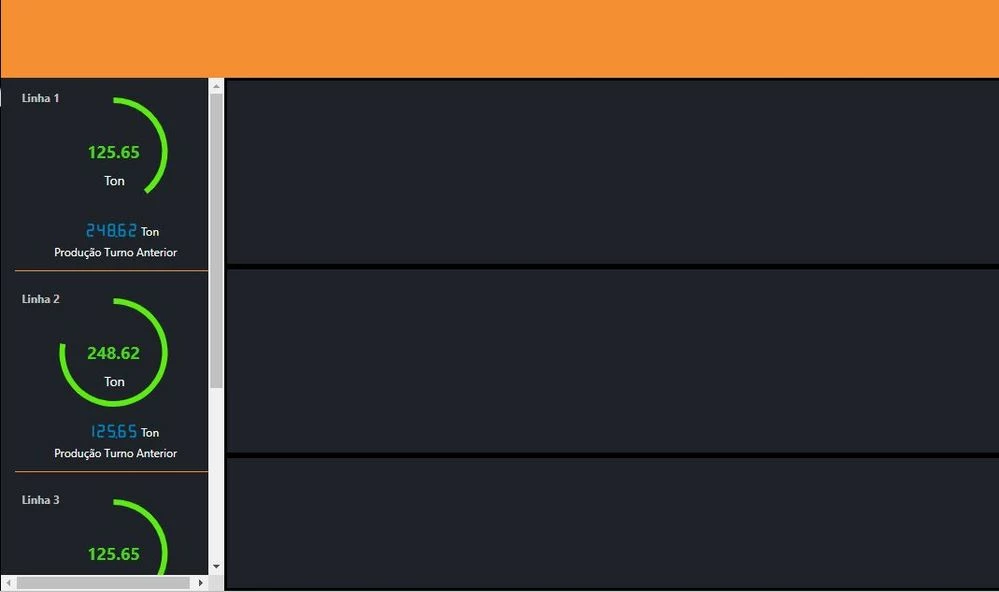
However, there are widget that does not responsive, so I need put on in front the widget panel and when I to run the mashup and change the monitor the widgets (that does not responsive) widgets don't look right on screen.


I am going to let the mashup's print below to facilitate understanding.


My question is: Is possible to create widgets responsives? If yes, how?

 

1920x1080.JPG1366x168.JPG

vangneAnswer
16-Pearl
Sep 20, 2019 11:51 AM UTC

@einsfele 

If you wish to make the gauge responsive, you would need to create your own widget using the original as a starting point.  Here's another community post that may be helpful.


Here's a link to a guide for creating your own extension.


If this resolves your issue, please post it here and mark it as the Accepted Solution for the benefit of others on the community.


thanks,

Vibhuti

8 replies

1-Visitor
Aug 29, 2019 3:36 AM UTC
18-Opal
Aug 29, 2019 4:12 PM UTC

Hello,


Can you do a sketch of what you expect it to look like?


/ Constantine

Translate
einsfele1-VisitorAuthor
1-Visitor
Aug 30, 2019 2:13 PM UTC

Hi @Constantine 


For example:


I am using a "progressive gauge" but this widget is static.


Is there any way that I can make it responsive?

Translate
18-Opal
Aug 30, 2019 2:19 PM UTC

Most of the widgets (including standard Gauge) resize automatically when you put them inside responsive containers.


Can you draw a simple mockup, please? It will make it easier to understand what exactly you want to achieve.


/ Constantine

Translate