
April 27, 2017
Solved

how to disappear a button onclicking?

  • April 27, 2017
  • 6 replies
  • 3054 views

I have a button called "continue", if I click on that button, that button should disappear.

how to do this?

Best answer by ankigupta

Hi Bavithraa Marimuthu​,

You can use an Expression widget for that with an an expression with returns false.

example Expression: 1==2?true:false

Set OutputBaseType as Boolean

And check the Output property.
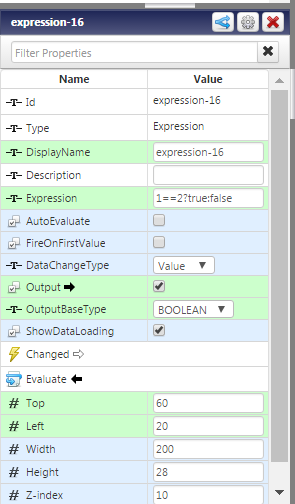
Bind the click event of button to Evaluate of Expression widget.

and link the output of Expression widget to visible property of the Button

Do let me know if you face any issues.

6 replies

14-Alexandrite
April 28, 2017

Hi Bavithraa Marimuthu​,

You could call a service when "Clicked" event is triggered for the button widget;

in the service you could return false and then bind the reuturn boolean value to the visible propterty to the button.

1. in your service author like this:

2. in mashup build like this:

Hope this helps,

Br,

Anna

ankigupta5-Regular MemberAnswer
5-Regular Member
April 28, 2017

Hi Bavithraa Marimuthu​,

You can use an Expression widget for that with an an expression with returns false.

example Expression: 1==2?true:false

Set OutputBaseType as Boolean

And check the Output property.

Bind the click event of button to Evaluate of Expression widget.

and link the output of Expression widget to visible property of the Button

Do let me know if you face any issues.

5-Regular Member
April 28, 2017

Also, set the visible property of Expression widget to false so that it does not show at run time.

April 28, 2017

But no button displays in the mashup