
Solved
How to display the folder name in the output after folder creation?
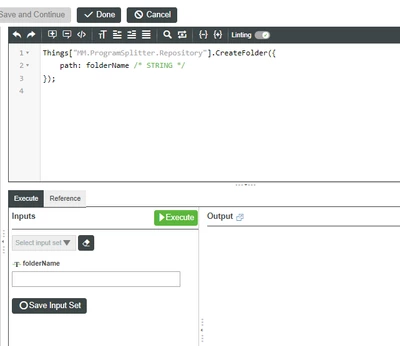
i've created a service for creating folder in the repository, how can i get the created folder name in the output as string/text?
thanks
keerthi

i've created a service for creating folder in the repository, how can i get the created folder name in the output as string/text?
thanks
keerthi
Hi
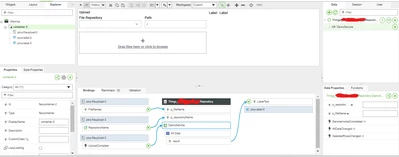
I hope this below sample code may helps you in after uploading a file from File Upload - Widget it will create the a folder based on a selected file name and upload that file in that created folder.
var repositoryName = p_repositoryName;
var renamedFolderName = '';
if (p_fileName != null && p_fileName != undefined && p_fileName != "") {
	try {
		var SplitPath = p_fileName.split(".");
		renamedFolderName = SplitPath[0];
	} catch (e) {
		renamedFolderName = 'NewFile';
	}
	try {
		try {
			Things[repositoryName].CreateFolder({
				path: renamedFolderName /* STRING */
			});
			//logger.info("renamedFolderName - " + renamedFolderName);
		} catch (e) {}

		Things[repositoryName].MoveFile({
			targetPath: '/' + renamedFolderName + "/" + p_fileName /* STRING */ ,
			overwrite: false /* BOOLEAN */ ,
			sourcePath: "/" + p_fileName /* STRING */
		});
		//logger.info("Target - " + renamedFolderName + " ; Soruce Path - " + p_fileName);
		result = p_fileName + " - Successfully uploaded into the folder of " + renamedFolderName;
	} catch (e) {
		result = "Error in File Upload in New Folder - See Script Error Log for more details.";
	}
} else {
	result = "Please Enter Value In Folder Name";
}
Mashup Binding:
I'm not clear about the req split files into multiple. If you are looking to Extract the Zip/Archive means you can use the Repository Service of ExtractZipArchive/ExtractArchive in this case you don't need to create any seperate folder.
Thanks & Regards,
Arun C
Enter your E-mail address. We'll send you an e-mail with instructions to reset your password.