1-Visitor
January 20, 2017
Solved

How to display the location of multiple objects on a google map and on clicking one object we get its location details.

  • January 20, 2017
  • 4 replies
  • 8846 views

we want to display the location of multiple objects on a google map at the same time and on clicking one marker we should get complete location details of that object.

Best answer by jkaczynski

Hello Priyanshi,

1. The easiest way.

​If your service that populates the Google Map returns also the additional attributes that should be shown when marker is selected, you can bind the SelectedRows of your service with the grid - this way, when you select the marker, a whole data regarding selected record will be passed to the grid:
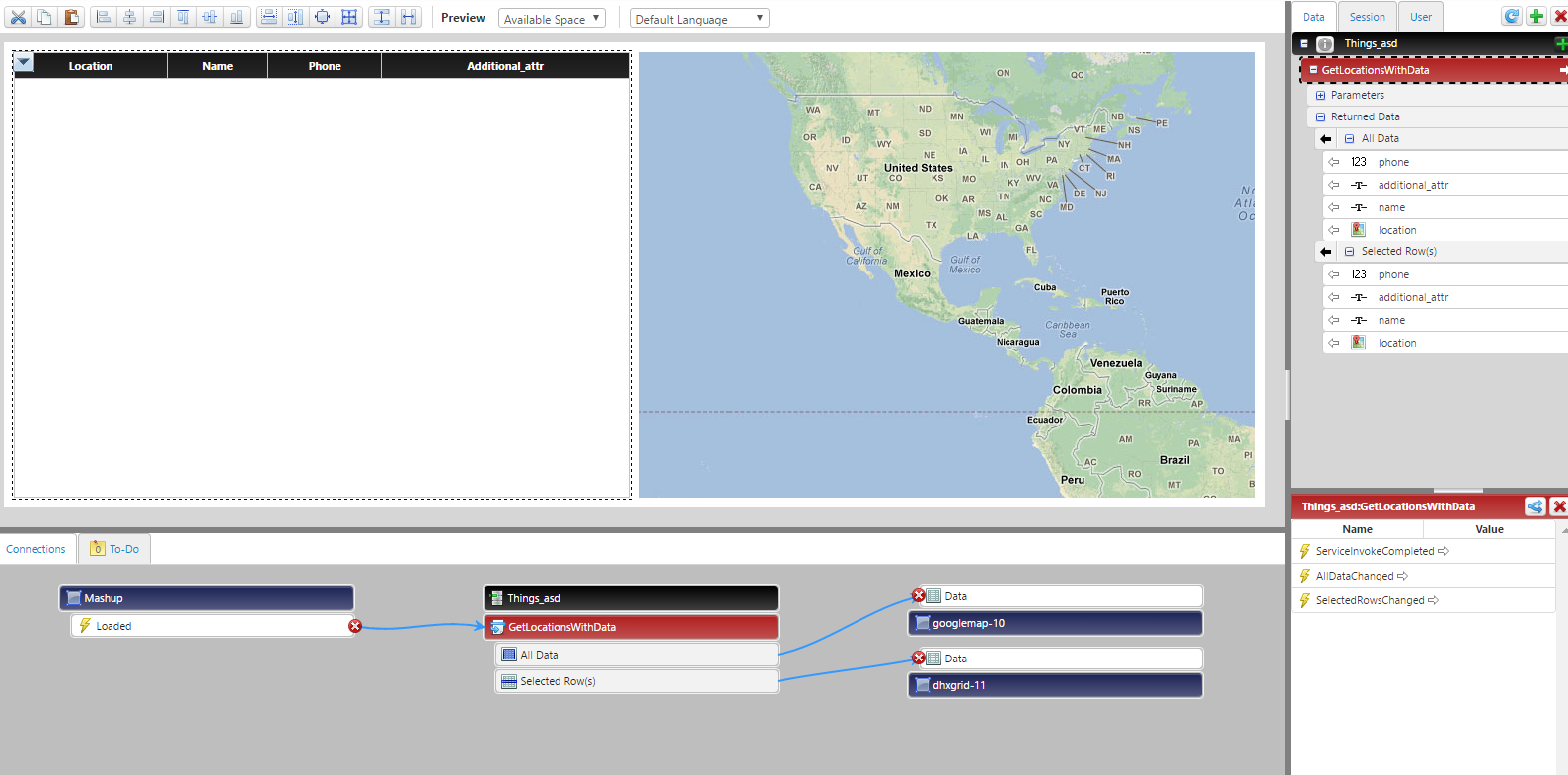
2. The more flexible way.

If you don't have the data as an result of the same service or don't want to use the previous way, you can pass the selected location parameter to additional service that returns more data:
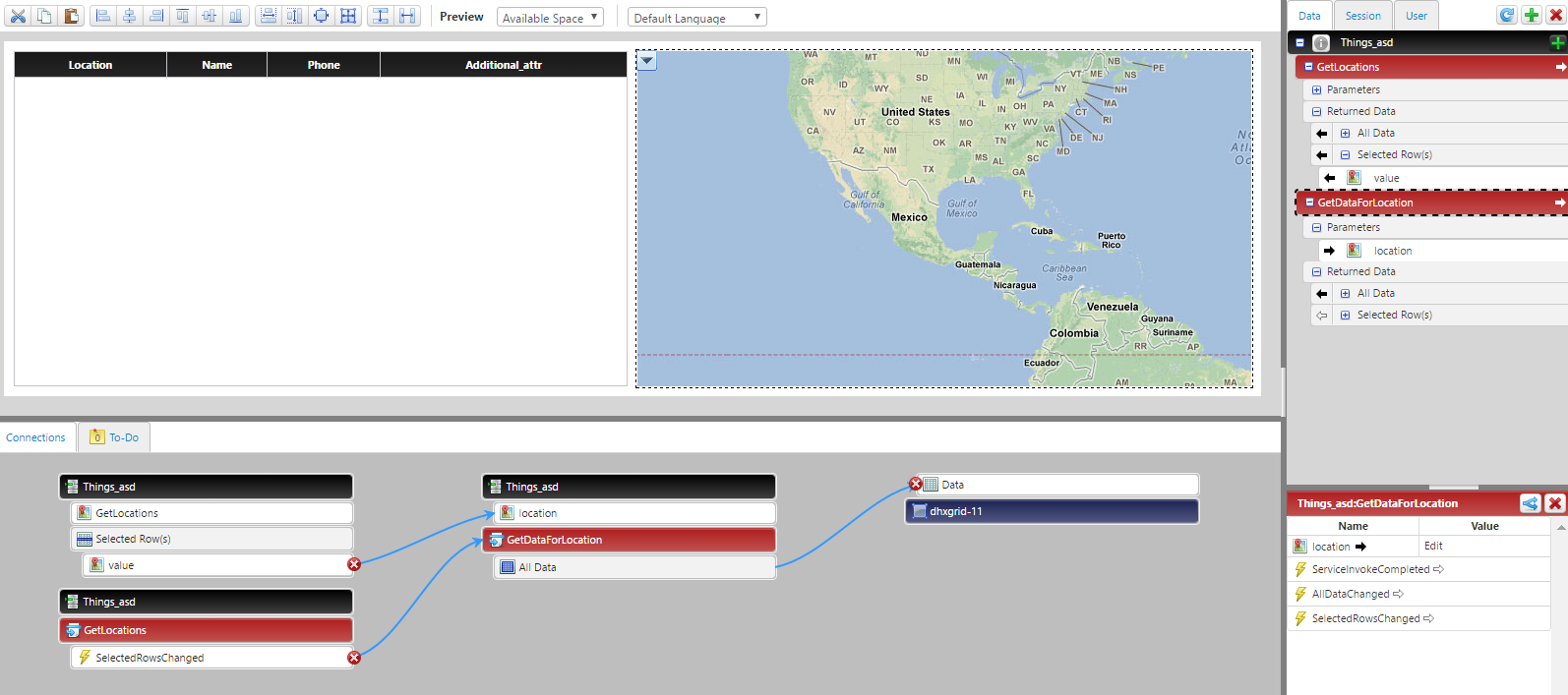
Hope that clarifies a little bit. In case of any questions, don't hesitate to ask.

Regards,

J.

4 replies

1-Visitor
January 20, 2017

Use Google Maps widget that's on the marketplace: https://marketplace.thingworx.com/Items/google-widgets

1-Visitor
January 20, 2017

Hello Priyanshi Saxena​,

You can use Google Map widget. It's easy. Just need to pass an infotable with at least one Location type field to the Data field and then pick this field in the LocationField widget property. Don't forget to mark true ShowMarkers property (but don't worry, it's true by default).

Hope it helps, let me know if you need any additional questions.

Regards,

J.

psaxena1-VisitorAuthor
1-Visitor
January 30, 2017

Hi Jakub,

Yes it worked, I am able to display multiple locations but how to display the data associated with those locations in the infotable (i.e other fields in the infotable) on selecting any marker on the map.

1-Visitor
January 30, 2017

Hello Priyanshi,

1. The easiest way.

​If your service that populates the Google Map returns also the additional attributes that should be shown when marker is selected, you can bind the SelectedRows of your service with the grid - this way, when you select the marker, a whole data regarding selected record will be passed to the grid:

2. The more flexible way.

If you don't have the data as an result of the same service or don't want to use the previous way, you can pass the selected location parameter to additional service that returns more data:

Hope that clarifies a little bit. In case of any questions, don't hesitate to ask.

Regards,

J.

5-Regular Member
January 30, 2017

Priyanshi Saxena​ I think you would require to use Tooltip option for that.

psaxena1-VisitorAuthor
1-Visitor
January 31, 2017

Hi Ankit,

Yes I have enabled the tooltip option but nothing shows.

5-Regular Member
January 31, 2017

Hi Priyanshi Saxena​,

It works fine for me. I passed all data (Location, Tooltip details) as data to Google Map. Then selected my LocationField and TooltipField properties from the dropdown and it shows data as expected.

What are the exact steps that you are following.

Capture.JPG

Thanks,

Ankit Gupta

1-Visitor
June 19, 2017

HI Jakub Kaczynski​, Hope you are doing well.I have question please.

i have used info-table to present multiple locations, each location point has some few properties that i could manage to show once the location point is clicked
Now, i need to present infotable as one of the data presented on each location point, so infotable within infotable, but actually data is shown in below format

it shows [object Object] instead of showing the content of info table, could you please assist