13-Aquamarine
June 21, 2023
Solved

How to enable button when we just enter the value in numeric entry widgets in thingworx.

  • June 21, 2023
  • 1 reply
  • 1664 views

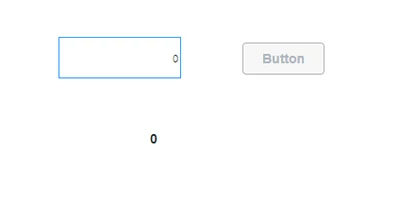
On mashup Load:

Hrishab108_0-1687330453844.png

we entry the value numeric entry box the button is not enabled
Hrishab108_1-1687330543119.png

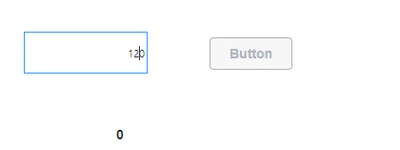
When i click outside the numeric box the button is enabled 

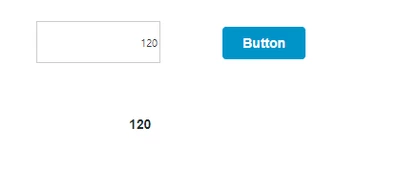
but i want that the button should be enabled as soon as we enter the value. Not need to click outside or around them.
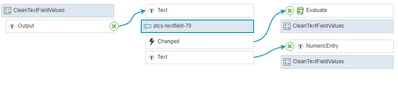
Hrishab108_0-1687332107832.png


Best answer by Markus_Neini

I did an quick and dirty approach here. There are still some cases that are not taken into account here. Just like negative decimals etc. What happens if an user enter "alphabetic" values or several "." or ","...

I think this should be enough as a starting point 😉


if (NumericEntry == undefined || NumericEntry == null || NumericEntry == "" || NumericEntry == "NaN" || NumericEntry == "0") {
	Output = "0";
} else {
	NumericEntry = NumericEntry.replace(/,/g, ".");
	if (!NumericEntry.includes(".")) {
		Output = NumericEntry.replace(/^0+/, '');
	} else {
		Output = NumericEntry;
	}
}


Do not use the auto-evaluate of the expression. Use the changed event instead.

Markus_Neini_0-1687417196939.png

The UI should look like.

 Markus_Neini_1-1687417209615.png

1 reply

12-Amethyst
June 21, 2023

Hi Hrishab,

depening on your ThingWorx version  I suggest, that you use the normal TextField-Widget and apply some "9999" in the mask field (On TWX version 9.4 the mask property is not working as expected anymore). So your user just can type numerical entries in your field. It also will refresh your value on every text changed event.

The problem with that workaround is that you can have leading zeros and cant type an "," or "." for decimals.

You could also apply some expression that "cleans" the inserted value, whenever the text changes. => remove leading zeros or allow just one ","/".".

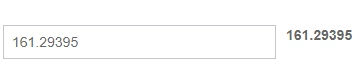
Markus_Neini_0-1687332488713.png

I hope I could help you out 🙂


Best regards

Markus


13-Aquamarine
June 22, 2023

pls can you provide me the expression?

12-Amethyst
June 22, 2023

I did an quick and dirty approach here. There are still some cases that are not taken into account here. Just like negative decimals etc. What happens if an user enter "alphabetic" values or several "." or ","...

I think this should be enough as a starting point 😉


if (NumericEntry == undefined || NumericEntry == null || NumericEntry == "" || NumericEntry == "NaN" || NumericEntry == "0") {
	Output = "0";
} else {
	NumericEntry = NumericEntry.replace(/,/g, ".");
	if (!NumericEntry.includes(".")) {
		Output = NumericEntry.replace(/^0+/, '');
	} else {
		Output = NumericEntry;
	}
}


Do not use the auto-evaluate of the expression. Use the changed event instead.

Markus_Neini_0-1687417196939.png

The UI should look like.

 Markus_Neini_1-1687417209615.png