
1-Visitor
September 15, 2020
Solved

How to give non admin user visibility permission

  • September 15, 2020
  • 2 replies
  • 4031 views

I have tried with login by organization URL but when I log in with any user it will show me a blank mashup

I have one organization name as "rezone" which under there are sub-organization which shows I below imageUntitled.png
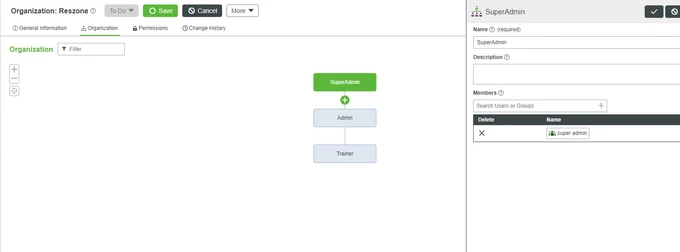
Each organization unit include it group which contained many users,

SuperAdmin - super admin group

Admin - admin group

Trainer- trainer


I want to give visibly permission to each group so that whenever I am login with any user it will show his related mashup after login.

EX. If I log in with super admin user I want to show the super admin dashboard mashup after login

same when admin login I want to show the admin dashboard mashup and,

when trainer login I want to show the trainer dashboard mashup.


How will I achieve this? please suggest( I'm using Thingworx 9.0)

Best answer by emscur

Hi @Suraj2692,


Are you logging in through <server name>/Thingworx/Composer or using the Organization login page?

This is the URL you should be accessing for login:

  • <server name>/Thingworx/FormLogin/<Organization Name>

If you are still unable to load the Home Mashup for non-admin users, please refer to the following help articles:


Regards,

Emmanuel


2 replies

19-Tanzanite
September 15, 2020

In the General Information tab you must select a Home mashup to which all users will be forwarded after the successful login.

Inside that mashup you must use a ContainedMashup widget whose Mashup property will be fed by a service that you must create in ThingWorx. That custom service should return the Mashup name you want based on the currently logged in user belonging to an Usergroup or Org - however you want. You will need to keep that mapping somewhere - a DataTable sounds enough for this (UserGroup -> MashupName)

Suraj26921-VisitorAuthor
1-Visitor
September 15, 2020
I have created a create user service which help to create a user and assign
to particular group let's say admin group. So whenever I will create user
using mashup it'll go in the respected group and I assign each user it's
home mashup.

So whenever I login using admin group user it will redirect to there home
mashup..So how I can do that.
5-Regular Member
September 15, 2020

Hello @Suraj2692,


You can achieve this by adding some functionality to your customer CreateUser service. Add an input parameter inputUserGroup to the service so you can map what group created users are part of. Find some code snippet below:


if (inputUserGroup == "SuperAdmin") {
 Users[inputUserName].SetHomeMashup({
	name: "SuperAdminUserMashup" /* MASHUPNAME */
});
}
else if (inputUserGroup == "Admin") {
 Users[inputUserName].SetHomeMashup({
	name: "AdminUserMashup" /* MASHUPNAME */
});
} else if (inputUserGroup == "Trainer") {
 Users[inputUserName].SetHomeMashup({
	name: "TrainerUserMashup" /* MASHUPNAME */
});
} 


This code should be placed after the user inputUserName has been created and assigned a User Group. It is simply setting the Home Mashup for each user based on the inputUserGroup passed as input parameter to the service.


I hope you find this information helpful.


Regards,

Emmanuel

Support
October 1, 2020

Hi @Suraj2692.


If you feel your question has been answered, please mark the appropriate response as the Accepted Solution for the benefit of others with the same question.


Thank you for your participation in our community!


Regards.


--Sharon