1-Visitor
February 12, 2020
Solved

How to increment a value in a infotable for creation of a geofence on map?

  • February 12, 2020
  • 1 reply
  • 2420 views

Hello ,

 I created a geofence using an infotable inside an infotable,i.e (outer infotable as columns id and location ,column location contains one more infotable along with columns again id and location region.).The location region column is with location base type and id has a GUID as base type.I need to increment a id value in outer infotable. So that I can close the geo fence set. Service as  follows :

region = me.map_regionCopy;
if(!region) {
params = {
infoTableName : "InfoTable",
dataShapeName : "Region"
};

// CreateInfoTableFromDataShape(infoTableName:STRING("InfoTable"), dataShapeName:STRING):INFOTABLE(Region)
region = Resources["InfoTableFunctions"].CreateInfoTableFromDataShape(params);
}

//var result = region;
var params = {
infoTableName : "InfoTable",
dataShapeName : "shape_for_geo1"
};

// CreateInfoTableFromDataShape(infoTableName:STRING("InfoTable"), dataShapeName:STRING):INFOTABLE(shape_for_geo1)
var result = Resources["InfoTableFunctions"].CreateInfoTableFromDataShape(params);
var newEntry = new Object();
//var i,n = 1;

for ( var i=1 in result.rows){
newEntry.LocationRegion = region; // INFOTABLE
newEntry.ID = i; // NUMBER [Primary Key]
// break;

i++

}


result.AddRow(newEntry);


But this is giving output as null infotable with column names where I can't see the data in infotable.


Thanks,

Bhargav.

 

Best answer by raluca_edu

Hi,


Please check this code:


var params = {
infoTableName : "InfoTable",
dataShapeName : "location"
};
location1 = Resources["InfoTableFunctions"].CreateInfoTableFromDataShape(params);
location1.AddRow( { id:"1", loc:"west" });
location1.AddRow( { id:"2", loc:"north" });
//logger.warn(" no of rows of location : "+location1.length);
var params1 = {
infoTableName : "InfoTable",
dataShapeName : "region"
};

var res = Resources["InfoTableFunctions"].CreateInfoTableFromDataShape(params1);
res.AddRow({ id:1, location:location1});

var result=res;


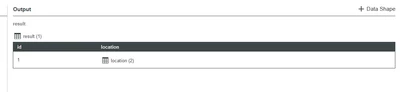
It is creating a nested infotable with 1 row that contains an id and an infotable location.

raluca_edu_0-1581596902517.png


Please use the above example for your requirement (my region datashape contains fields: id and location of type infotable).


Hope it helps,

Raluca Edu


1 reply

17-Peridot
February 13, 2020

Hi,


Please use the following for instead of yours and adjust the values as you need (I don't like that you use i++ in a for loop):


for(var i = 0; i < result.length; i++) {
newEntry.LocationRegion = region; // INFOTABLE
newEntry.ID = i; // NUMBER [Primary Key]
}

Hope it helps,

Raluca Edu


Bhargav11-VisitorAuthor
1-Visitor
February 13, 2020

Hello Raluca Edu,

  I tried the for loop suggested by you in my service, but still, the output is null, same as shown in the previous attachment.


Can you suggest me any other way or is there any problem in my code.


Thanks,

Bhargav.

17-Peridot
February 13, 2020

Hi,


Please check this code:


var params = {
infoTableName : "InfoTable",
dataShapeName : "location"
};
location1 = Resources["InfoTableFunctions"].CreateInfoTableFromDataShape(params);
location1.AddRow( { id:"1", loc:"west" });
location1.AddRow( { id:"2", loc:"north" });
//logger.warn(" no of rows of location : "+location1.length);
var params1 = {
infoTableName : "InfoTable",
dataShapeName : "region"
};

var res = Resources["InfoTableFunctions"].CreateInfoTableFromDataShape(params1);
res.AddRow({ id:1, location:location1});

var result=res;


It is creating a nested infotable with 1 row that contains an id and an infotable location.

raluca_edu_0-1581596902517.png


Please use the above example for your requirement (my region datashape contains fields: id and location of type infotable).


Hope it helps,

Raluca Edu