Hello @Bhargav1,
After reading your question about OpenStreet Map Widget, I reviewed the article CS225480.
The first mistake I make in following the directions, was using the incorrect data type to store the location. When defining the “Region Data Shape” use the “Location” data type for the Location field.
I followed the directions and created a DataTable.
When using the Service “AddDataTableEntries”, I provided a location and values for the info table “values”. When providing entries for the “Values” you need to supply the ID and then as may points as required for your region. Keep in mind that the first and last point need to be the same to result in a closed shape, so for a square you need 5 points.
After doing the data entry, remember to execute the service to add the data to the table.
To verify that you have added the data correctly you can use the service “GetDataTableEntries”. At this point you should have one row. That row would contain the data you entered and an info table of the coordinates for the region.
The next step is to add the “GetDataTableEntries” service from the Data table you created to the mashup.

The next step is to bind the data to the OpenStreets Widget. There are 5 different places to bind the data.
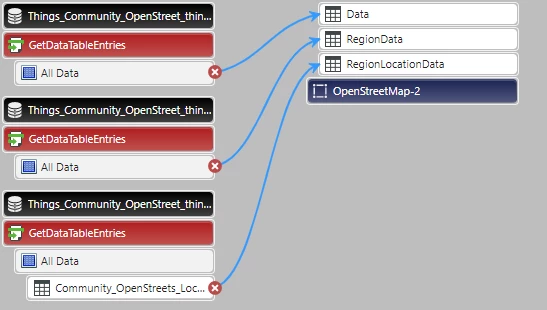
I used "Data", "RegionData", and "RegionLocationData".
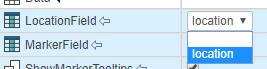
If you want to see a pin in the map where you location is Drag the ALL DATA to the OpenStreets "Data" binding. Having done that you need to select the field which will be used for data. This should look like:
Also make sure that display is turned on:

You should see one pin.
To see a region takes a few more steps:
Drag ALL DATA to “RegonData”
Drag the info table from inside your ALL DATA to the “RegionLocationData”
You should now have something that looks like:
Now you need to configure the region information, similar to what you did for the location.
The choices I have may be different from yours. But you should have a choice for each field.

Then make sure that you have turned display on, "ShowRegions" needs to be checked.
Save everything and view your mashup. You should have something displayed.

