10-Marble
September 14, 2023
Solved

how to make text field multiline

  • September 14, 2023
  • 1 reply
  • 1953 views

Hi developers,


I have a PTC Textfield widget binded to a datasource which usually has a big name but i have limited space on mashup.

I need to make it multiline but its not giving an option in properties.

On clicking wrap, its still not taking data in next row. Please suggest.


Best answer by Arun_C

Hi @VK_10159720 ,


Kindly take this mashup entity backup before updating the below given suggestions.

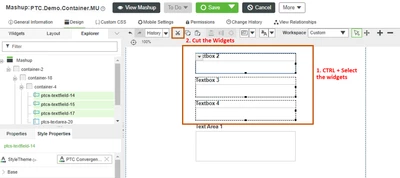
Using Cut & Paste option in  Design Time, we can able to arrange the order of widgets. After the Textarea widget in placed in last then Cut the another 3 textboxes by CTRL + Select the required widgets.

Arun_C_0-1694806206371.png

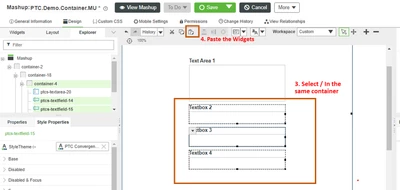
Without saving the mashup immediately please Paste the widgets in the same/required container.

Also you can select the each widgets to Drag & Drop it to the required place in same container.

Arun_C_1-1694806468530.png


Thanks & Regards,

Arun C

1 reply

16-Pearl
September 14, 2023

HI @VK_10159720 ,


Have you tried with PTC TextArea - Widget for multi-line text in a mashup.

Arun_C_0-1694698363574.png

Thanks & Regards,

Arun C

10-Marble
September 15, 2023

Hi @Arun_C ,


thanks for your response.

Yes, i am aware of Text Area. Issue is that in the mashup which i am using, it is a responsive mashup and in one container it has already four other textfield.

The Textfield which is causing issue is the first one in container, if i try to remove and add new TextArea then that TextArea comes in the last of container and not in the first.

Please suggest

Arun_C16-PearlAnswer
16-Pearl
September 15, 2023

Hi @VK_10159720 ,


Kindly take this mashup entity backup before updating the below given suggestions.

Using Cut & Paste option in  Design Time, we can able to arrange the order of widgets. After the Textarea widget in placed in last then Cut the another 3 textboxes by CTRL + Select the required widgets.

Arun_C_0-1694806206371.png

Without saving the mashup immediately please Paste the widgets in the same/required container.

Also you can select the each widgets to Drag & Drop it to the required place in same container.

Arun_C_1-1694806468530.png


Thanks & Regards,

Arun C