
8-Gravel
September 15, 2023
Solved

how to provide visibility permission to all media type entity?

  • September 15, 2023
  • 2 replies
  • 1216 views

how to provide visibility permission to all media type entity? If I have n no. of media type entities and I want to provide my test user to have visibility permission to all the existing media type and new media entities.

what will be the ay to do this?
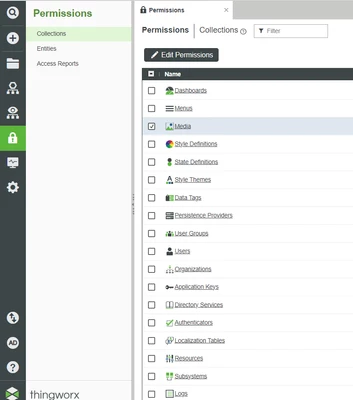


Best answer by Sathishkumar_C

Apply permissions at collection level,

Sathishkumar_C_0-1694788009947.png

Permissions > Collections > Select "Media" 

Click "Edit Permissions" for Visibility and Runtime Permissions.

2 replies

19-Tanzanite
September 15, 2023

In such situations, what you usually do is to script the assignment of the visibility permissions to the needed media type entities.

By script I mean creating a service which does that.

First loop through all media entities (SpotlightSearch), then for each of them assign the visibility (it's one of the services available under a media entity)

17-Peridot
September 15, 2023

Apply permissions at collection level,

Sathishkumar_C_0-1694788009947.png

Permissions > Collections > Select "Media" 

Click "Edit Permissions" for Visibility and Runtime Permissions.