
13-Aquamarine
July 6, 2021
Question

How to remove entities dependency to a project when packaging and publishing Solution Central

  • July 6, 2021
  • 1 reply
  • 1758 views

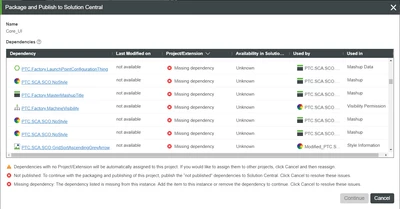
I have a project I want to package and publish to solution central, when I click the package and publish button, I get some error messages:
EM_9923519_1-1625607398352.png

There are dependencies with some entities, whenever I click on any of them a message appears 

EM_9923519_0-1625607379905.png

How to search for those entities that seem to be removed but their dependency is still alive?

EM_9923519_2-1625607536505.png


1 reply

5-Regular Member
July 7, 2021

This LaunchPointConfiguration Thing is a part of ThingWorx manufacturing apps. Did you install manufacturing apps and then uninstalled/deleted them? If yes, then there could be a chance of having ghost entities. If you are on ThingWorx 9+ you can check this here - https://support.ptc.com/help/thingworx/platform/r9/en/#page/ThingWorx%2FHelp%2FBest_Practices_for_Developing_Applications%2FExampleGhostEntities.html%23wwID0ENYAZ
If you are on  8.5 or older version of ThingWorx, then I think you need to import a ghost entity extension to check this.

13-Aquamarine
July 7, 2021

I am using ThingWorx 8.5.3-b123 


One more question, if this is not the only extension that was deleted, Do I need to reinstall all to be able to export the project to solution central?


Is there a way to bypass reinstalling no needed extensions?


Thanks

13-Aquamarine
July 7, 2021

I mean something similar to DeleteGhostEntities ThingWorx 8.5.3-b123 ...