
7-Bedrock
May 8, 2025
Solved

How to resize the file upload widget width?

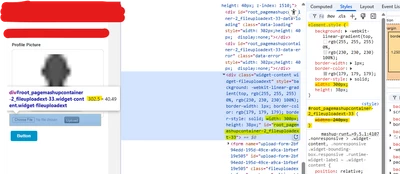
Need to resize the width of the upload widget. Tried following css codes. It's applying but somehow overridden by default size (300 px).


#root_pagemashupcontainer-2_fileuploadext-33-bounding-box{
 width: 240px; !important 
}
SC_10187722_0-1746683266531.png


17-Peridot
May 14, 2025

Working fine with following code.

fileuploadext-11 --> Widget ID

.widget-fileuploadext .fileuploadext-file-input {
 width: 170px;
}
 
.widget-fileuploadext .file-browser {
 width: 220px;
}
 
#root_pagemashupcontainer-2_fileuploadext-11 {
 width: 240px !important;
}
#root_pagemashupcontainer-2_fileuploadext-11-bounding-box{
 width: 240px !important;
}


3 replies

Support
May 12, 2025

Hi @SC_10187722 


What version of ThingWorx are you running?


Regards.


--Sharon

Translate
5-Regular Member
May 14, 2025

You can refer following article to assist you further


https://www.ptc.com/en/support/article/CS377455?source=search

https://www.ptc.com/en/support/article/CS367776?source=search


Thanks

Bhawna

Translate
17-Peridot
May 14, 2025

Working fine with following code.

fileuploadext-11 --> Widget ID

.widget-fileuploadext .fileuploadext-file-input {
 width: 170px;
}
 
.widget-fileuploadext .file-browser {
 width: 220px;
}
 
#root_pagemashupcontainer-2_fileuploadext-11 {
 width: 240px !important;
}
#root_pagemashupcontainer-2_fileuploadext-11-bounding-box{
 width: 240px !important;
}


Translate