
14-Alexandrite
February 15, 2022
Solved

How to set a boarder color in schedule widget.

  • February 15, 2022
  • 1 reply
  • 1345 views

Dear all developers,


I'm trying to set up schedule widget with reffering to the following page.
YoshihikoN_0-1644913821672.png

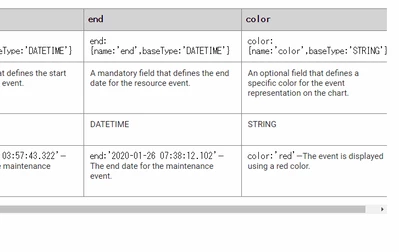
as shown the below image, it seems that "color" parameter in the entry means the color for both background and boarder.


Could you let me know on how to separately set border color ( if we can, selected color as well ) in code basis ?


let newEntry = {
reason: item.PRDORD, // STRING [Primary Key]
info: item.ITMCOD, // STRING
start: item.ACTDAT, // DATETIME
end: item.ENDDAT,// DATETIME
color: "pink", // STRING
};

YoshihikoN_1-1644914131502.png


Thanks and Regards,

Yoshihiko


Best answer by bchaudhary_448008

Hello @Yoshihiko.N ,


Yes, Unfortunately this is the limitation.


Regards

Bhawna

1 reply

5-Regular Member
February 16, 2022
14-Alexandrite
February 22, 2022

Hi Bhawna,

Thanks.

according to the link, we cannot customize schedule widgets except of options in the following items.
"color" in the following parameter means the color of both boarder color and background color.
is my understanding correct ?

YoshihikoN_0-1645515416085.png


5-Regular Member
February 22, 2022

Hello @Yoshihiko.N ,


Yes, Unfortunately this is the limitation.


Regards

Bhawna