Best answer by yhan

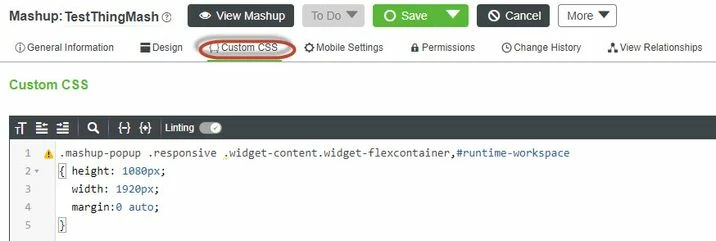
Then you can add the below css code to this mashup:


#runtime-workspace
{ height: 1080px;
 width: 1920px;
 margin:0 auto;
}


6-7-2021 4-57-57 PM.jpg

1 reply

17-Peridot
June 7, 2021

1. Take a backup of \webapps\Thingworx\Runtime\index.html

2. Edit index.html and modify order of resolution options from following section


<select class="resolution-picker">
 <option value="FHD 1920x1080">FHD 1920x1080</option>
 <option value="Fullscreen">Fullscreen</option>
 <option value="1024x768">1024x768</option>
 <option value="1280x1024">1280x1024</option>
 <option value="1366x768">1366x768</option>
 <option value="HD 1280x720">HD 1280x720</option>
 <!--<option>iPhone Landscape</option>-->
 <!--<option>iPhone Portrait</option>-->
 <option value="iPad Landscape">iPad Landscape</option>
 <option value="iPad Portrait">iPad Portrait</option>
 <!--<option>Custom</option>-->
</select>


3.Save and close file (Tomcat restart is not required)
4. Refresh Mashup (depending on browser cache clearing might be required)

1-Visitor
June 7, 2021

Thank you @yhan ,

 I have tried this, but no use.


BP_9517166_0-1623047280682.png

This is how it will look like when it is FHD.

BP_9517166_1-1623047392772.png


yhan17-PeridotAnswer
17-Peridot
June 7, 2021

Then you can add the below css code to this mashup:


#runtime-workspace
{ height: 1080px;
 width: 1920px;
 margin:0 auto;
}


6-7-2021 4-57-57 PM.jpg