
17-Peridot
May 23, 2020
Solved

How to set the "Selected Row(s)" in custom widget ?

  • May 23, 2020
  • 4 replies
  • 2184 views

Hi, 

I created a custom table widget ,  the widget can bind data and display well .  When the table row get selected , I can get the selected row(s),  but  how can I set the  rows to  the binding service's "Selected Row(s)" ?


I can defined a JSON property as selected value,  but I prefer the standard mashup  binding style for selected rows. 
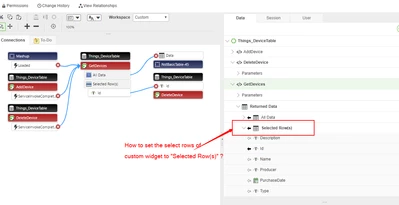
 

seanccc_0-1590247876171.png


Regards,

Sean


Best answer by CarlesColl

I think something like:

// -- yourWidget it's the javascript instance of your widget
// -- Where 'Data' it's the name of the infotable property on your widget
// -- [array..] --> if you have single select, something like [3] or multi select [0,3,8]
yourWidget.updateSelection('Data',[array of indexes to be selected]);

4 replies

1-Visitor
May 24, 2020

I think something like:

// -- yourWidget it's the javascript instance of your widget
// -- Where 'Data' it's the name of the infotable property on your widget
// -- [array..] --> if you have single select, something like [3] or multi select [0,3,8]
yourWidget.updateSelection('Data',[array of indexes to be selected]);
seanccc17-PeridotAuthor
17-Peridot
May 26, 2020

@CarlesColl ,


Thank you for your hint.  While I found updateSelection indeed used to update the Selected Rows,  the widget.runtime.js must also has function "handleSelectionUpdate" defined , otherwise the runtime framework will assume that the widget doesn't care about selection update. 


one more question,  where do you get the following API comment ?   I couldn't find it in the ThingWorx Extension Development Guide . 

// -- yourWidget it's the javascript instance of your widget
// -- Where 'Data' it's the name of the infotable property on your widget
// -- [array..] --> if you have single select, something like [3] or multi select [0,3,8]


Regards,

Sean

1-Visitor
May 26, 2020

It's my own one 😉