
How to Set Width for ptcs-dynamicpanel When Opening a Mashup?
Hello everyone,
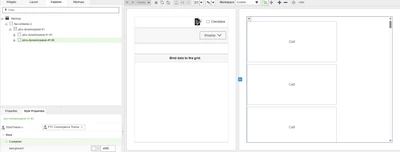
I am working on a ThingWorx Mashup where I have a flex container that contains a ptcs-dynamicpanel. This panel is divided into two sections:
Left Side: Contains more widgets and occupies a significant portion of the screen.
Right Side (ptcs-dynamicpanel-41 #2): Contains fewer widgets, but by default, it opens with too much width.
Issue:
I want to reduce the width of ptcs-dynamicpanel-41 #2 when the mashup opens. However, I do not see any width property available in the widget’s settings. I have tried adjusting the flex container settings, but the right panel still expands too much when the mashup loads in the browser.
What I Have Tried:
Checking the Properties of ptcs-dynamicpanel-41 #2 – No direct width option found.
Expected Behavior:
When the mashup opens, the right panel should have a smaller width instead of taking up a large portion of the screen.
The layout should remain responsive without affecting the left panel’s visibility.
Does anyone have experience with controlling the width of ptcs-dynamicpanel? Is there a way to set a default width or restrict expansion? Any guidance or alternative approaches would be appreciated!
Thanks in advance for your help!