8-Gravel
October 9, 2023
Solved

How to setting line graph

  • October 9, 2023
  • 1 reply
  • 1865 views

Now i got line chart like picture below but i want to modify something

1.X-Axis that is a time didn't show full date

2.On the right hand side, i want to edit sequence that L.33 is first one and then L.34 , L.35 respectively.


Thank you
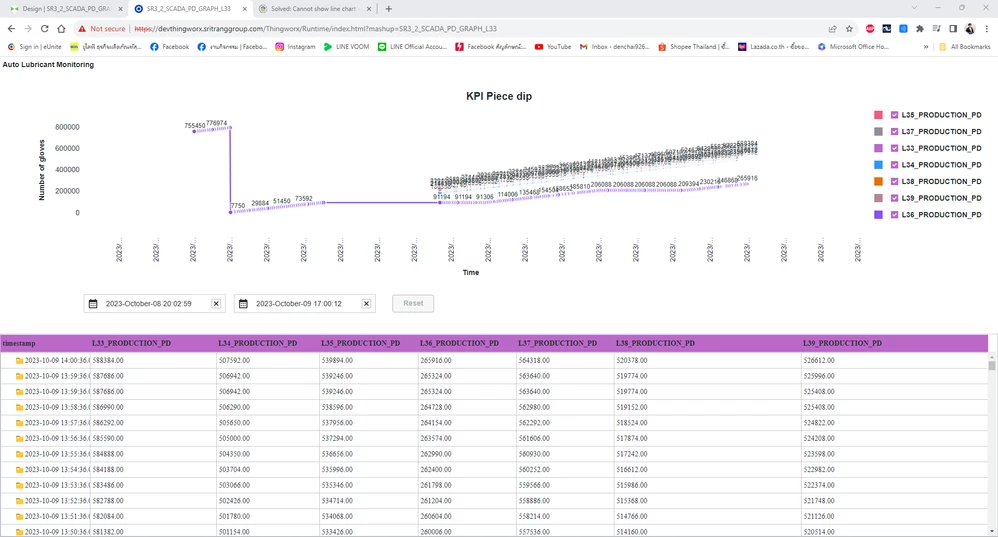
Screenshot 2023-10-09 140307.png 


Best answer by Velkumar

Hi @DR_10558933 


For Line Chart, you can try changing XAxisType to Date/Time and set XAxisDateFormatToken. Also, set HorizontalAxisLabelsRotation to 0. 


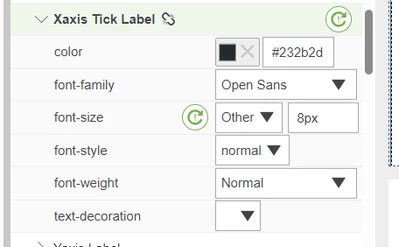
In Widget Style Properties, reduce Xaxis Tick Label font size  to fit into the chart

Velkumar_5-1696837857595.png


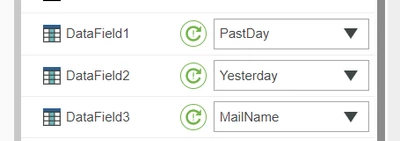
For sequence, you can set NumberOfSeries to 7. Select DataField based on your sequence 

Velkumar_2-1696837542370.png


/VR

1 reply

Velkumar19-TanzaniteAnswer
19-Tanzanite
October 9, 2023

Hi @DR_10558933 


For Line Chart, you can try changing XAxisType to Date/Time and set XAxisDateFormatToken. Also, set HorizontalAxisLabelsRotation to 0. 


In Widget Style Properties, reduce Xaxis Tick Label font size  to fit into the chart

Velkumar_5-1696837857595.png


For sequence, you can set NumberOfSeries to 7. Select DataField based on your sequence 

Velkumar_2-1696837542370.png


/VR

8-Gravel
October 9, 2023

another question, can i change format when i put the mouse to some point at the line chart ?Untitled.jpg 

19-Tanzanite
October 9, 2023

HI @DR_10558933 


For custom tooltip please refer here - Creating Custom Chart Tooltips (ptc.com)


/VR