17-Peridot
June 30, 2022
Solved

How to show "No Data" like this in advanced grid widget?

  • June 30, 2022
  • 2 replies
  • 1987 views

How to show "No Data" like this in advanced grid widget? Kindly refer the attached image.
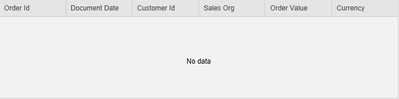
AP_9587236_0-1656595992900.png


Best answer by M4RC

Hello,

before your service returns an empty value, you can add a fixed row, which contains a value like "Nothing found".

M4RC_0-1658133127062.png


Best regards

Marc

2 replies

19-Tanzanite
July 1, 2022

Very simple. I use a contained mashup (one which has that message in the center), that I switch to. I do not use the Grid itself for this situation.

17-Peridot
July 14, 2022

when there is data for corresponding search, the grid should show all the rows. When there is no data for the corresponding search, we should show no data. If anyone have any idea let me know.

M4RC14-AlexandriteAnswer
14-Alexandrite
July 18, 2022

Hello,

before your service returns an empty value, you can add a fixed row, which contains a value like "Nothing found".

M4RC_0-1658133127062.png


Best regards

Marc

14-Alexandrite
July 18, 2022

This is a bit aside so it will not answer your question but be aware that this behaviour is OOTB with the new grid in 9.3

