1-Visitor
August 21, 2019
Solved

How to show text box data in value display

  • August 21, 2019
  • 3 replies
  • 2183 views

My mashup has two text box widgets, two button widgets and two value display widgets as shown in the attached image. Now I want to store the text box data in a table once the ok buttons are pressed and show the data in their corresponding value display widgets. 

Though it is very basic and fundamental, step by step instructions would be much appreciated. 
Best answer by PEHOWE

Hello @Rajesh_Kumar 

The guide being referenced from Rajesh, will assist you in developing a solution.

I thought I would provide some additional direction for your exact question. You already have a mashup.

  • Create a THING object.
  • Provide a “Properties” item for each field. This is to hold the value to be linked back to the valuedisplay.
  • Create a service to update each valuedisplay with the value text from a text box. Since you have 2 buttons, I would guess 2 services.
  • The next step is to link everything together.
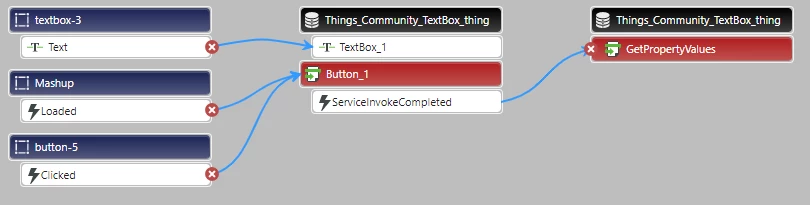
    • Text Box to the service which uses the value
    • Button to service to activate the service
    • ServiceInvokeCompleted to GetPropertyValues to update the ValueDisplays
    • community_textBox.png
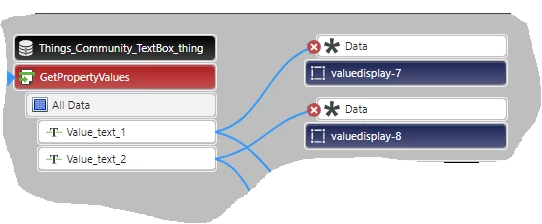
    • The fields returned from the GetPropertyValues are linked to the Value Display.
    • Community_textBox_2.png


3 replies

Support
August 21, 2019

Hi @ Rajesh_Kumar.


We have a number of guides available on our Developer portal that can walk you through this type of design.  You may want to start with Get Started with ThingWorx for IoT but there are many others available.


Regards.


--Sharon

PEHOWE17-PeridotAnswer
17-Peridot
August 21, 2019

Hello @Rajesh_Kumar 

The guide being referenced from Rajesh, will assist you in developing a solution.

I thought I would provide some additional direction for your exact question. You already have a mashup.

  • Create a THING object.
  • Provide a “Properties” item for each field. This is to hold the value to be linked back to the valuedisplay.
  • Create a service to update each valuedisplay with the value text from a text box. Since you have 2 buttons, I would guess 2 services.
  • The next step is to link everything together.
    • Text Box to the service which uses the value
    • Button to service to activate the service
    • ServiceInvokeCompleted to GetPropertyValues to update the ValueDisplays
    • community_textBox.png
    • The fields returned from the GetPropertyValues are linked to the Value Display.
    • Community_textBox_2.png