
14-Alexandrite
April 30, 2019
Solved

How use a query filter in mashup and how to export mashup as image files jpeg.

  • April 30, 2019
  • 1 reply
  • 1680 views

Hi All,


I had create my project in a older Thingworx version, it works fine.

I can create the query.
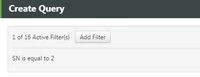
pic1.jpg

when i migrate to a New version 8.4.2 ? I am not able to create a query.

the arrow seem different??
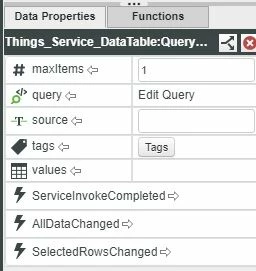
pic2.jpg

Can anyone guide me? Not sure if there is a change in step to create query? 

Please do direct me to any tutorial or document which show how to do it. I will try it out.


I hope to know if anyone know how to snapshot a runtime mashup into an image, if there any extension that can snapshot a mashup and save it in the File Repository?


Hope someone can advice me!


Thank you! 

Newbie Kek

Best answer by PaiChung

You probably need to start a new thread with that other question.

from what i understand, there is indeed some compatibility issue with the pdf extension, not sure what they will be doing to resolve that (if at all).

1 reply

22-Sapphire I
May 6, 2019

l believe that unfortunately is a bug, not sure when that will be fixed.

You could define that Query separately in another widget and bind it in.

Maybe a text box, expression widget or a datafilter widget could hold that definition.

newieKek14-AlexandriteAuthor
14-Alexandrite
May 9, 2019

Thank you PaiChung!


I cheated using GetDataTableEntryByKey to get my filter data out.

Thanks for info.


Not sure if anyone can advice on  capture RunTime Mashup as Jpeg/image. 

I used PdfExport in the previous version, but i cannot get it work in the new version...so i am looking for alternative way. Hope anyone can advice me !!


Thank you.

Best regards

Newbie Kek

PaiChung22-Sapphire IAnswer
22-Sapphire I
May 9, 2019

You probably need to start a new thread with that other question.

from what i understand, there is indeed some compatibility issue with the pdf extension, not sure what they will be doing to resolve that (if at all).