1-Visitor
December 24, 2020
Solved

Hyperlink in Grid Advanced (Thingworx 8.5.2)

  • December 24, 2020
  • 2 replies
  • 3091 views

Hi ,

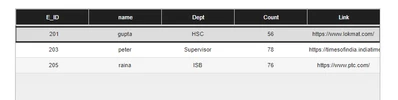
I have a Grid Advance in Mashup , running on Thingworx 8.5.2 , i had to add Hyperlink as Column Value. and i added it using Column Base Type as 'Hyperlink' but at runtime in grid its not Clickable. please see below screen..
 

VS_9760165_0-1608811883628.png

Thanks


Best answer by Ashritha

Hi @VS_9760165 ,

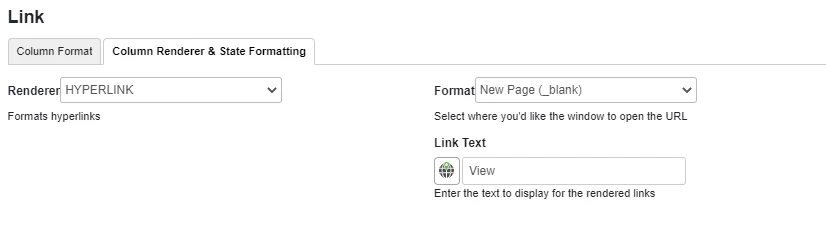
It may be due to grid settings, Please follow below steps

  1. Click on grid
  2. Click on Configure and Bindings
  3. Select Link column
  4. Click on Column Renderer & State Formatting tab
  5. Select Renderer : HYPERLINK
  6. Select Other parameters as shown in the image below
    • Capture1.PNG


2 replies

5-Regular Member
December 24, 2020


Hi @VS_9760165 ,


Maybe this post can assist further https://community.ptc.com/t5/ThingWorx-Developers/how-to-add-link-in-grid-advanced/td-p/686780


Hope it helps,

1-Visitor
December 24, 2020

Hi @Ciprian-Traian 


above post is more about Checkbox but they have provided below Answer for Hyperlink . see below screenshot of that post..and already i did the same but not clickable.

VS_9760165_0-1608813817127.png


Thanks

15-Moonstone
December 24, 2020

Create a field/column with Hyperlink as datatype and bind data to advanced grid. The Link will appear as below

Ashritha_0-1608816932387.png

When view is clicked , navigates to target link .

1-Visitor
January 4, 2021

Hi @Ashritha ,

I have added field like below in infotable..

VS_9760165_1-1609735928984.png

In datashape have added Link Field with Basetype Hyperlink as below...

VS_9760165_2-1609736042034.png

getting output as..

VS_9760165_3-1609736251878.png


But still not clickable...its highlighting complete row when i move cursor to row as in above 1st post . what do i need ?

Thanks

Ashritha15-MoonstoneAnswer
15-Moonstone
January 4, 2021

Hi @VS_9760165 ,

It may be due to grid settings, Please follow below steps

  1. Click on grid
  2. Click on Configure and Bindings
  3. Select Link column
  4. Click on Column Renderer & State Formatting tab
  5. Select Renderer : HYPERLINK
  6. Select Other parameters as shown in the image below
    • Capture1.PNG