

I am facing problem in providing color to text in label widget using css code .
Adding this in for anyone else who runs across the same issue, I was having a little bit of trouble initially figuring out how to use the CustomClass feature for the widgets (no offense to you PTC but the documentation was pretty tough to find on this and a tad bit wacky, definitely could use some updates, link to it is at the bottom) with CSS, so for those of you like me, here you go:
1) Add your Custom CSS class to the Mashup's Custom CSS tab:
- Here is what your class should look like if you want to change the Background label color to red, first name being the CustomClass, second being the widget class
.Red ptcs-label:not([no-wc-style])[variant=label] {
background: red;
}
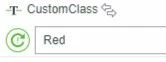
2) Next, populate the CustomClass parameter of your label widget:
- Find your widget
- Input the name of the CustomClass and it will override the CSS for the widget
(TIP: There does not need to be a dot "." in front of it.)
3) Save and refresh:
- Your class should be working, mind you this Widget parameter can also be bound to a service, which is super nice for doing dynamic CSS changes, hope this helped someone,
Best,
Logan
Links: