6-Contributor
September 29, 2023
Solved

I can not set the LOCATION data into INFOTABLE

  • September 29, 2023
  • 1 reply
  • 1231 views

hi, all

Now I'm working with Thingworx 9.2.0.

I create ex1Thig and add ex1Infotable property defined by ex1Datashpe includes LOCATION base type field to show the location on the Google Map Widget as below.

The location field is available at the setting default value in INFOTABLE.

But the location field in not available in edit value in INFOTABLE because the location column is missing, Why?

Thanks.


1 ex1Datashape
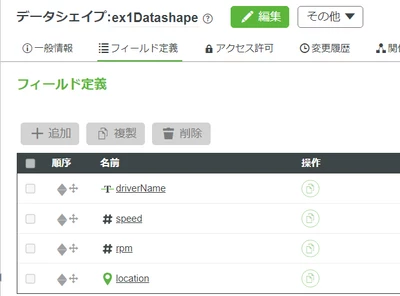
DEVYIDEyoshi_1-1695968764642.png

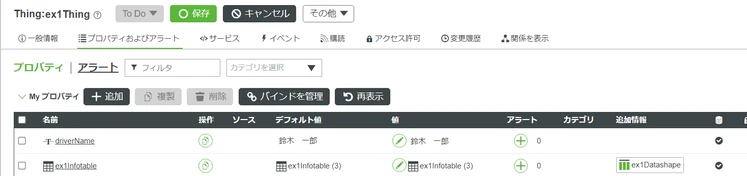
2 ex1Thing

DEVYIDEyoshi_2-1695968942769.png


3 ex1Infotable -> default value -> all columns are available.
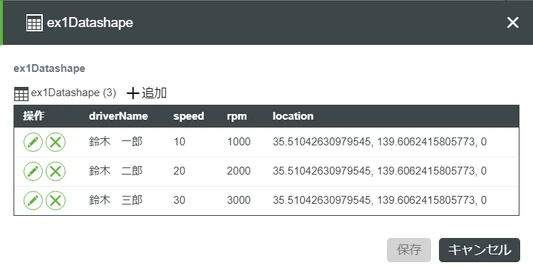
 

DEVYIDEyoshi_3-1695969075369.png

4 ex1InfoTable -> value setting --> no location field!
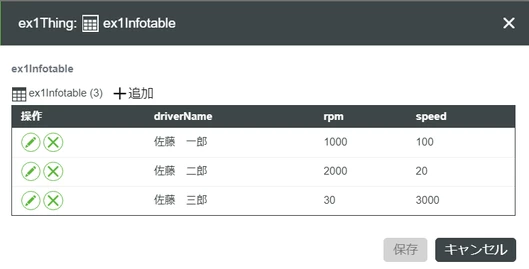
 

DEVYIDEyoshi_4-1695969121899.png


Best answer by VladimirRosu_116627

Hi @DEV,YIDE,yoshi ,

Some questions to clarify the situation:

  1. If you click on the pencil icon to edit a row, do you see the location field? (maybe it's not visible when looking at all rows, but visible when editing a single row)
  2. Create a new Data Shape, but change the name of the "location" field to something else, like "deviceLocation". Repeat your tests with this new DataShape and let us know if you see this issue. There are some field names that are reserved (and we're in the process of documenting them). It might be that "location" is such a reserved name.

As a side note, ThingWorx 9.2.0 is out of support since June 2023 (according to the PTC Release Advisor link here). I strongly suggest trying to upgrade to the latest release of ThingWorx, which at the moment of writing is 9.4.1, purely because of security reasons. Security threats appear almost each day, and I observed in Internet that we see each day more and more news about new security threats. Considering this, as a best practice, it is best to make sure you have the latest versions of any software that incorporate all the security fixes (not only PTC's).

1 reply

19-Tanzanite
September 29, 2023

Hi @DEV,YIDE,yoshi ,

Some questions to clarify the situation:

  1. If you click on the pencil icon to edit a row, do you see the location field? (maybe it's not visible when looking at all rows, but visible when editing a single row)
  2. Create a new Data Shape, but change the name of the "location" field to something else, like "deviceLocation". Repeat your tests with this new DataShape and let us know if you see this issue. There are some field names that are reserved (and we're in the process of documenting them). It might be that "location" is such a reserved name.

As a side note, ThingWorx 9.2.0 is out of support since June 2023 (according to the PTC Release Advisor link here). I strongly suggest trying to upgrade to the latest release of ThingWorx, which at the moment of writing is 9.4.1, purely because of security reasons. Security threats appear almost each day, and I observed in Internet that we see each day more and more news about new security threats. Considering this, as a best practice, it is best to make sure you have the latest versions of any software that incorporate all the security fixes (not only PTC's).

6-Contributor
September 29, 2023

Thanks for your quick reply

Now everything OK to change ""location  to "myLocation". 

Yoshi From Yokohama