

I removed all borders but my button still has one when selected
Every PTC button has a border around it when selected. I can't seem to get rid of it. Basically, if you click the button, a border appears. If you click anywhere else, even into another app, the border goes away. I had to do a screen capture just to show what I am talking about. Here I have removed the border from every aspect of this button. Is there a way to remove this? It doesn't actually appear to have anything to do with the border property in css.
The button on the left is the one for this example but every button in thingworx does this.
When it is selected(I had to do a printScreen because if I clicked on my snipping tool it would go away)
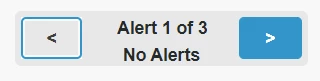
When it is not selected, or it is but I click on anything else.

I have tried custom CSS but this does not appear to be a CSS related issue? Hopefully I am wrong about that.