1-Visitor
May 20, 2016
Question

i want to apply aggregate on infotable
  • May 20, 2016
  • 16 replies
  • 9853 views

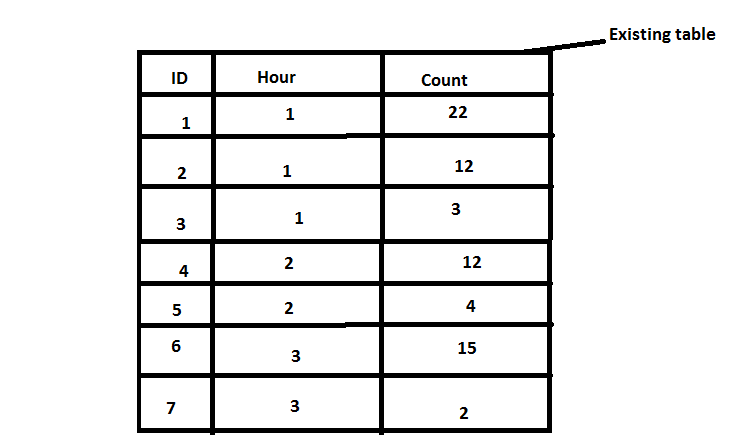
existing table.png

The above is the existing info table now i need to group by based upon the Hour as shown below
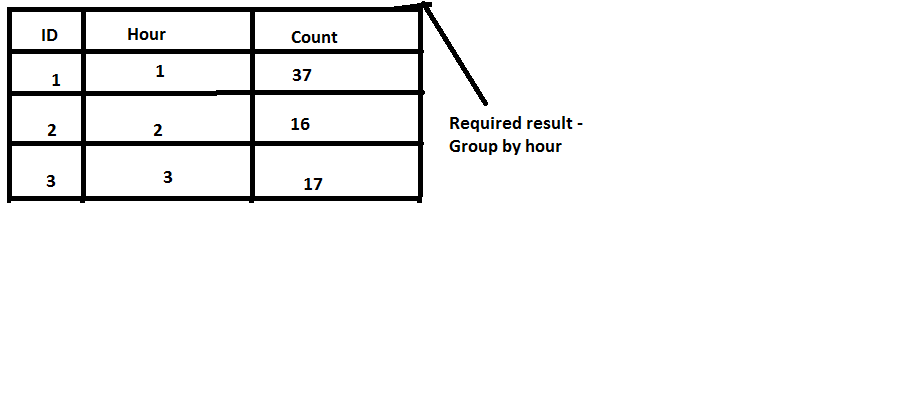
Required data.png

Kindly help me on this

16 replies

1-Visitor
May 20, 2016

Hi,

You just need to use InfoTable.Aggregate snippet.

var result = Resources["InfoTableFunctions"].Aggregate({

    t: infotableVar,

    columns: "Count",

   aggregates: "SUM",

  groupByColumns: "ID,Hour"

});

1-Visitor
May 4, 2018

Hi,


I am unable to use aggregation for sum or max or min value calculations.


Here is my code: 


var params = {
path: "test_aggrigation.csv" /* STRING */,
columnMappings: undefined /* STRING */,
hasHeader: undefined /* BOOLEAN */,
longitudeField: undefined /* NUMBER */,
dateFormat: undefined /* STRING */,
fileRepository: "FileStorageThing" /* THINGNAME */,
latitudeField: undefined /* NUMBER */,
fieldDelimiter: undefined /* STRING */,
stringDelimiter: undefined /* STRING */,
dataShape: "aggrigateShape" /* DATASHAPENAME */
};

// result: INFOTABLE
var data = Resources["CSVParserFunctions"].ReadCSVFile(params);

logger.warn(data);


//Aggregate code start from here..

var result = Resources["InfoTableFunctions"].Aggregate({
t: data,
columns: "temp_min",
aggregates: "SUM",
groupByColumns: "temp_max,date"
});


ERROR Code:

Error executing service:

Error executing service calculateMin. Message :: java.lang.String cannot be cast to java.lang.Number - See Script Error Log for more details.


Can you please help me on this?


Regards

Vikas


1-Visitor
May 4, 2018

temp_min column it's a String or a Number?


But anyway, ReadCSVFunctions shouldn't work, as you are missing some required parameters like columnMappings, focus first on reading correctly the csv file, and the temp_min columns as a Number and then aggregate
