
1-Visitor
June 21, 2016
Solved

I would like one button to add rows to a grid widget and another button to remove rows, not sure how to accomplish this

  • June 21, 2016
  • 4 replies
  • 7624 views

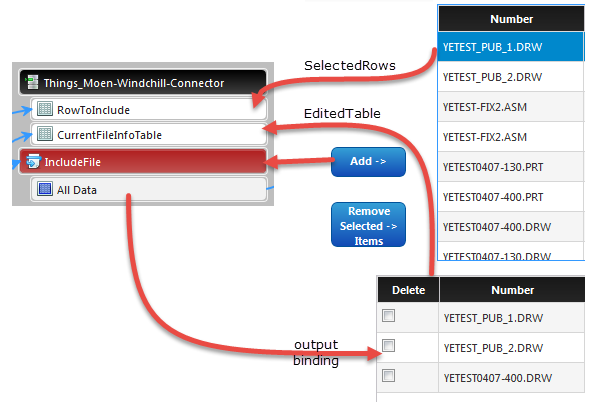
I have two grid widgets on my screen, and I have successfully configured a button to call a service that adds any selected rows from grid # 1 to grid # 2 using Resources["InfoTableFunctions"].Union between two infotable inputs - one being the selected rows data from grid # 1 and the other being the editedtable all data of grid # 2. The output infotable from that service is bound to grid # 2.
2016-06-21_7-57-34.png

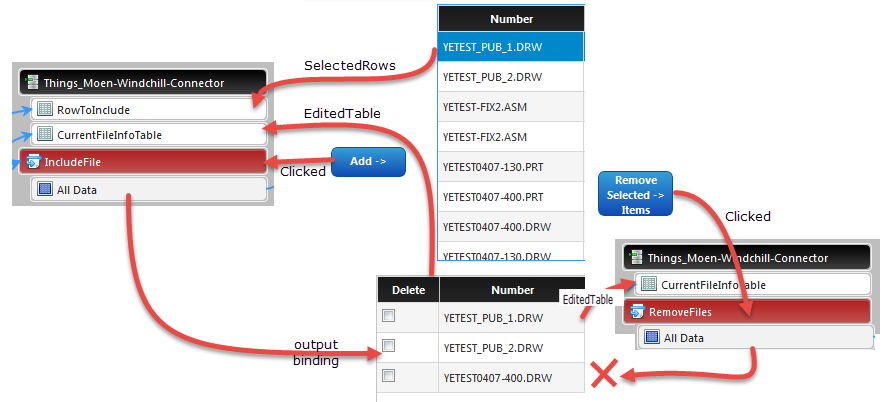
I wanted another button that would remove rows from grid # 2 if they checked an editable checkbox in the rows. I wrote another service that can iterate the rows and remove any that have the checkbox checked, but I can't bind the output of THAT service to grid # 2 since it is already bound to the output of the first service.
2016-06-21_7-57-34.png

Any suggestions?

Best answer by qngo

I had this kind of situation several times when I want to bind many sources of data to the widget. In your case, here's what I can think about:

- Create a Thing like Helper.Mashup which contains a String property "SOURCE_DATA"

- Create a service somewhere which has 2 inputs Infotable "dataInclude" and "dataRemove" with the same DataShape as the one of data result (for grid #2). This service returns also an Infotable of the same DataShape.

- Bind 2 results All Data of the 2 services IncludeFile and RemoveFiles to the 2 inputs of the service above. Bind the result to the grid #2

- In your service IncludeFile, add: Things[Helper.Mashup].SOURCE_DATA = "INCLUDE"

- In your service RemoveFile, add: hings[Helper.Mashup].SOURCE_DATA = "REMOVE"

Now you can imagine that I try to use the property SOURCE_DATA to identify where is the data come from in order to return it to the grid #2. So, some more steps:

- In the new service, add a check: if (Things[Helper.Mashup].SOURCE_DATA = "INCLUDE") {var result = dataInclude} else {var result = dataRemove}

- Bind two events ServiceInvoked of two services IncludeFile and RemoveFile to this new service.

What do you think about this work-around ?

4 replies

1-Visitor
June 21, 2016

Hi

I think following scenarios will work i guess

A) Your First Grid should have one service LoadFirstGridContent on mashup load

B) Your Second Grid should have one service LoadSecondGridContent service for iterating the first grid content on mashup load

C) Clicking on ADD Button will call service which will Add content on GridFirst to GridSecond ... After this service is completed (serviceinvokecompleted event) bind to LoadSecondGridContent service so as to newly load content from First Grid

D) Clicking on Remove Button & checked Rows of grid will call separate service which will remove the checked rows .... After this service is completed (serviceinvokecompleted event) bind to LoadSecondGridContent service so as to newly load content

yevans1-VisitorAuthor
1-Visitor
June 21, 2016

Thanks for the suggestion. I think it matters that the first grid is populated on demand from another service executing a search using a search term the user has entered, so i cannot use "on mashup load", I have to wait for the user to search for something. Then, they review the search results and pick and choose which files to select from grid # 1 and add to grid # 2. But I need to provide the functionality for them to remove a row in grid # 2 if they change their mind or accidentally select a wrong file from grid # 1.

In item C), which service do you mean "Clicking ADD button will call service"? A third service?

I can have the ​serviceinvokedcompleted​ event trigger the service that updated grid # 2 but it needs an input, and I then run into the same problem, I can't have two different service outputs bound to that same input.

Any other ideas?

1-Visitor
June 21, 2016

In this case

A) SearchFiles Service bind to the first grid and when SearchFiles Serviceisinvoke complted you then bind other service

i.e to load the second grid call service say LoadSecondGridcontentonsearch (At this point both grid will have contents on basis of serach)

B) Now user will select row from Grid 1 and click "ADDFILES" button here we bind service say ADDContent having param as selected Row from grid 100

C) When  ADDContent service is completed we will call the same service from (A)  LoadSecondGridcontentonsearch which will load newly content added in (B)

(D)Now to remove row from grid # 2 say we have service say REMOVERow , so when user clicks on Remove Button it will call this service REMOVERow

   having param as selectedrow from grid # 2 , when REMOVERow service is serviceinvoke completed call the service LoadSecondGridcontentonsearch in (A)

   based on search term by user


  ### As long as user selects grid # 1 row and try to hit RemoveRow button we need to provide a validator widget and show status message on that

   or simply show/hide (visible property of button (bool) - use expression widget)RemoveRowButton only when user selects row from Grid # 2 or check the checkbox from grid # 2

yevans1-VisitorAuthor
1-Visitor
June 21, 2016

Thanks Nilesh for your proposed solution but it does not help.

Can anyone else think of a way to accomplish my goal of being able to update one table with two services (since the table can only be bound to the output of one server)?

Thanks

qngo1-VisitorAnswer
1-Visitor
June 22, 2016

I had this kind of situation several times when I want to bind many sources of data to the widget. In your case, here's what I can think about:

- Create a Thing like Helper.Mashup which contains a String property "SOURCE_DATA"

- Create a service somewhere which has 2 inputs Infotable "dataInclude" and "dataRemove" with the same DataShape as the one of data result (for grid #2). This service returns also an Infotable of the same DataShape.

- Bind 2 results All Data of the 2 services IncludeFile and RemoveFiles to the 2 inputs of the service above. Bind the result to the grid #2

- In your service IncludeFile, add: Things[Helper.Mashup].SOURCE_DATA = "INCLUDE"

- In your service RemoveFile, add: hings[Helper.Mashup].SOURCE_DATA = "REMOVE"

Now you can imagine that I try to use the property SOURCE_DATA to identify where is the data come from in order to return it to the grid #2. So, some more steps:

- In the new service, add a check: if (Things[Helper.Mashup].SOURCE_DATA = "INCLUDE") {var result = dataInclude} else {var result = dataRemove}

- Bind two events ServiceInvoked of two services IncludeFile and RemoveFile to this new service.

What do you think about this work-around ?

yevans1-VisitorAuthor
1-Visitor
June 22, 2016

Yes, that works very well! I was trying to go down a similar path - if you use pure JS in a web app and define a click event on an HTML element like a button, in the function called by the event you could query the source of the event with something like event.target.id to determine which button was pushed. I could not figure out how to do that in a mashup, so your solution basically achieves the same effect.

I just defined a variable as a property on the thing where all my services are - so I basically have three services:

includeFile:

me.sourceData = "include";

removeFile:

me.sourceData = "remove";

updateTable:

if (me.sourceData === "include) {

  <add selected rows of grid # 1 to grid # 2>

} else if (me.sourceData === "remove") {

  <remove checked rows from grid # 2>

}

I only need to bind the two tables as inputs to the third service, the first two services have no inputs or outputs. I just bound the serviceInvokeCompleted event for both of them to the third service.

Thanks for your help, I've been trying to figure this out for a week!

Yale

1-Visitor
June 22, 2016

You're welcome. Good to know that could help!

Quang-Dung

1-Visitor
October 11, 2016

Thanks for the work around. i used it for two buttons, one adding one day and the other retrieving one day, and the result of the two services associated with the buttons goes to a datetime picker trouhg a custom service called MyService wich is based on the source property of the thing,

Capture.PNG

Capture.PNG

Capture.PNG