
1-Visitor
January 25, 2021
Solved

Infotable Aggregate data for specific timeframe as hourly or daily

  • January 25, 2021
  • 2 replies
  • 2648 views

Hello there,

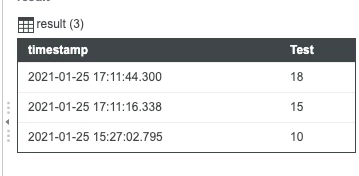
I have a time series like this:
PD_9592550_0-1611591861070.png

This is the result of a QueryPropertyHistory call for Test property of a thing.


Is there any way to group by a specifying time frame such like hourly or daily and ask to have the AVG value of "Test" column ?

I saw that in the Aggregate function you can specify the column for which aggregate data, but you can't make any operation on the data contained in that column, such like truncate the datetime value to have an hourly or daily based aggregation.


Thanks,

Paolo

Best answer by PaiChung

You are correct, I would first add the grouping column you need then you can aggregate and add that grouping with the aggregate function.

2 replies

PaiChung22-Sapphire IAnswer
22-Sapphire I
January 25, 2021

You are correct, I would first add the grouping column you need then you can aggregate and add that grouping with the aggregate function.

PaoloDR1-VisitorAuthor
1-Visitor
January 26, 2021

So the only way I have to achieve the result is to literate all the InfoTable adding the column and the expected value for each row?

22-Sapphire I
January 26, 2021

I would run a DeriveFields to add the column(s) you need for grouping and then run the Aggregate

Support
February 2, 2021

Hi @PaoloDR.


If you feel your question has been answered, please mark the appropriate response as the Accepted Solution for the benefit of others in the community.


Regards.


--Sharon