
16-Pearl
June 17, 2020
Solved

Infotable Aggregate on multiple columns

  • June 17, 2020
  • 1 reply
  • 2750 views

Hi ,

I am trying aggregating multiple columns as shown below, i tried with putting comma separated columns but don't work. What is the solution?
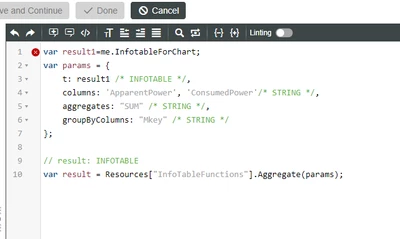
VaibhavShinde_0-1592377741640.png

when i try with only one column, the above code works fine.


Thanks

Best answer by CarlesColl

You aren't using the right format, columns it's a comma separated list of values, and aggregates also:


var result = Resources["InfotableFunctions"].Aggregate({
 t: result1,
 columns: "ApparentPower,ConsumePower",
 aggregates: "SUM,SUM",
 groupByColumns: "Mkey" 
});

1 reply

1-Visitor
June 17, 2020

You aren't using the right format, columns it's a comma separated list of values, and aggregates also:


var result = Resources["InfotableFunctions"].Aggregate({
 t: result1,
 columns: "ApparentPower,ConsumePower",
 aggregates: "SUM,SUM",
 groupByColumns: "Mkey" 
});