
6-Contributor
December 29, 2021
Solved

Installation of ThingWorx 9.3 on D: Drive, Windows 2016

  • December 29, 2021
  • 1 reply
  • 5058 views

Good Day ThingWorx teams, 


I am trying to install ThingWorx 9.3 Postgres on a D:Drive (with 500GB) as the C drive is designed only for the OS and has just 32GB free.  


Postgres and JAVA have installed correctly on the D:Drive.  When the ThingWorx installer runs, according to the log, it finds and access both Postgres and JAVA without problems.  


I completes the installation, yet fails to connect to ThingWorx at the end of the installation.  I turned off Windows Defender, and even tried restarting ThingWorx in services before the time out.  


I un-checked the SSL checkbox when configuring the installer.  This was per a similar post for a similar sounding issue with the ThingWorx Installer.  
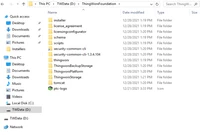
 

Populated Directory 2021-12-28_15-26-37.png

Ideas for next steps?


Thank you.  


Preston


Best answer by slangley

Hi @PrestonTJohnson.


From a review of the case, it appears the issue was resolved by doing the following:

  1. Using localhost instead of the full computer name in the graphical installer
  2. Creating a twadmin login/owner in PostgreSQL for the thingworx database 

If you agree that this was the solution, please mark this post as the Accepted Solution for the benefit of others with the same issue.


Regards.


--Sharon

1 reply

24-Ruby III
December 29, 2021
6-Contributor
December 29, 2021
17-Peridot
December 30, 2021

@PrestonTJohnson


When you run the installer does it install to the Default location? (C:)


Have you set the configuration variable THINGWORX_PLATFORM_SETTINGS?


https://supportdev.ptc.com/help/thingworx/platform/r9/en/#page/ThingWorx/Help/Composer/Security/SSO/ConfigurePlatformSettingsJsonFile.html