
10-Marble
Jan 23, 2024 1:28 PM UTC
Solved

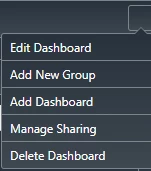
Is there a way to translate the terms used on a Dashboard Widget?
MS_10929021_0-1706016358436.png

Talking about these lines in particular and the respective menus they open - for the main user base it would be very inconvenient if these were English only and make the whole widget almost wholly unusable sadly. 


Running on Version 9.3.7!

19-Tanzanite
Jan 23, 2024 7:44 PM UTC

I searched in the support.ptc.com this topic by entering the terms "dashboard localization".

I strongly suggest using also this search feature in the future.

The third entry points to this article which should answer your question if I got it right.

In short, in each localization table you already have tokens for them:

VladimirRosu_0-1706039022453.png


4 replies

16-Pearl
Jan 23, 2024 1:45 PM UTC

Hi @Frowne 


Kindly take a look at the below article, and let us know if you have any doubts.

https://www.ptc.com/en/support/article/CS342169


Thanks,

Surya

Translate
Frowne10-MarbleAuthor
10-Marble
Jan 23, 2024 3:20 PM UTC

Thanks for the swift reply! From my potentially limited understanding, Localization Tokens can only be used in localizable fields of which I find no properties in the Dashboard Widget, hence the question - unless I'm missing something?

Translate
16-Pearl
Jan 23, 2024 4:48 PM UTC

Hi @Frowne 


Kindly find the attached screenshot, change the language for a particular user at the user journal information tab, and let me know if you have any doubts.

Translate
19-Tanzanite
Jan 23, 2024 7:44 PM UTC

I searched in the support.ptc.com this topic by entering the terms "dashboard localization".

I strongly suggest using also this search feature in the future.

The third entry points to this article which should answer your question if I got it right.

In short, in each localization table you already have tokens for them:

VladimirRosu_0-1706039022453.png


Translate