
January 25, 2017
Solved

Issue on Thingworx Composer

  • January 25, 2017
  • 4 replies
  • 6733 views

Hi All,

on my local PC after starting Apache/Tomcat  and I use the local Thingworx Composer I receive in the first composer page the following message

“Error searching - please try again ('Unable to Invoke Service SpotlightSearch on SearchFunctions : Unable to get search entries: [1.018] Data store unknown error: [Error occurred while accessing the model provider.]')”
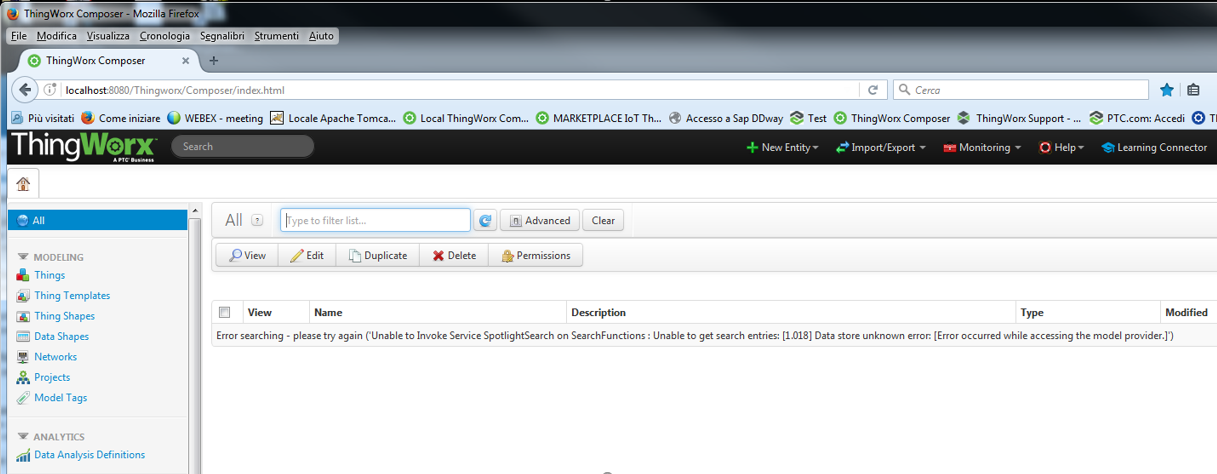
Sometimes I succeed to use Thingworx Composer after one or more restart of Apache/Tomcat

Sometimes Thingworx Composer works only after restart of the PC

This morning Thingworx Composer returns always the above message , even if I restarted Apache/Tomcat more times and the PC as well

Any suggestion ? Thanks!

BR

Dimitri

I use Windows 7 (64bit) - java-jdk1.8.101 - Apache/Tomcat 8.0.36 - Thingworx 7.2.3-b48

Best answer by jkaczynski

Hello Dimitri,

Please remove the values in the Initial memory pool and Maximum memory pool. Then save, restart Tomcat and try again. I believe, that the values 128 and 256 are too low for Tomcat / Thingworx to run properly. The developer instance minimal settings should be at least 512m, the more the better.

For more informations on that, please refer to the Thingworx Installation guide (especially Appendix A: Tomcat Java Options Settings).

4 replies

5-Regular Member
January 25, 2017

Can you go to Monitoring > Application Log and see if there are any additional errors? What version of ThingWorx is this? What version of Tomcat? And what OS?

20-Turquoise
January 25, 2017

What is your database? Neo4j, H2, Postgresql/DSE?

If it's an external database, please ensure the connection is stable.

1-Visitor
January 25, 2017

Hello,

To all the above questions I will add another one: What are your Tomcat memory settings?

January 25, 2017

Hi All ,

Thank you for your concern.

About your request :

OS PC           --> Windows 7 (64Bit) - 16GB Ram

Tomcat           --> I use the version 8.0.36.0

database        --> Neo4j (It is not an external db is part of thingworx)

memory setting for Tomcat --> -Xms128m -Xmx256m (I thibk that is a correct answer)

Many Thanks

BR

Dimitri

1-Visitor
January 25, 2017

Hello Dimitri,

Please remove the values in the Initial memory pool and Maximum memory pool. Then save, restart Tomcat and try again. I believe, that the values 128 and 256 are too low for Tomcat / Thingworx to run properly. The developer instance minimal settings should be at least 512m, the more the better.

For more informations on that, please refer to the Thingworx Installation guide (especially Appendix A: Tomcat Java Options Settings).

1-Visitor
January 26, 2017

Good it's working fine. Always glad to help.

Regards,

J.