
14-Alexandrite
November 5, 2024
Solved

Issue with Line Chart Not Plotting Last Data Point

  • November 5, 2024
  • 3 replies
  • 1606 views

Hi PTC Community,

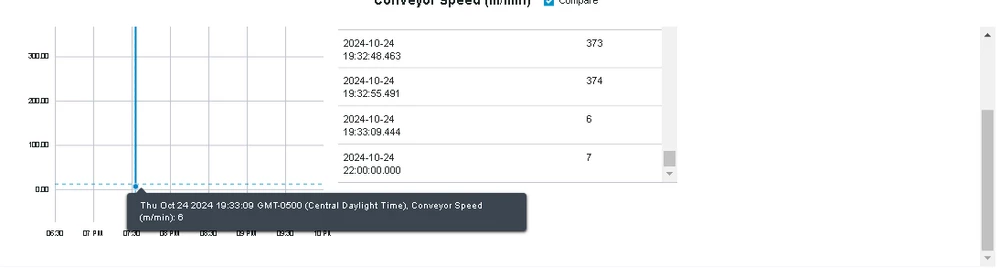
I'm currently facing an issue with the line chart in ThingWorx. Occasionally, the line chart fails to plot the last data point from the dataset. This happens inconsistently, and I haven't been able to identify a clear pattern or cause.

Here are a few details about the issue:

  • The dataset is correctly populated, and I have verified that the last data point exists.
  • The issue doesn't occur every time but happens sporadically.
  • When I inspect and check the preview in the API response, I can see the last data point is present, but it still doesn't show on the chart.
  • The same data is binded to Grid and chart and i can see the last timestamp is 2024-10-24 22:00:00.000 on grid where as 2024-10-24 19:33:09.444 in linechart.
    Note - i am using ChartType as Step in linechart.
    Additionally, I noticed that when I change the start date from X time to Y time while keeping the end date the same, the graph plots correctly when using Y time as the start date. 


  • Screenshot from 2024-11-05 16-46-26.png
Best answer by abandal

Hello @leekhil_kataray 


I see that we have not received the solution for this post. Were you able to resolve this issue by yourself? If so, would you be comfortable posting the solution in the community and marking it as the accepted solution for the benefit of other community members?


If you are still struggling to find the solution, please let us know if you are comfortable opening a case. I would be happy to open the case on your behalf.


Regards,

Abhi

3 replies

18-Opal
November 5, 2024

What if you extend your X axis to the right a bit, e.g. add +1 hour to it?

14-Alexandrite
November 5, 2024

I have tried extending the X-axis by setting the maximum to the last data point plus one hour, but this still does not resolve the issue.

Additionally, I noticed that when I change the start date from X time to Y time while keeping the end date the same, the graph plots correctly when using Y time as the start date.
18-Opal
November 5, 2024

Then maybe it has something to do with the Y scale? I don't see a point at 19:33:09 either. What if you try limiting the Y max to something like 10 -- do you see all data points now?

Rocko
19-Tanzanite
November 5, 2024

When you say "The issue doesn't occur every time but happens sporadically", do you mean it happens sporadically with the same dataset or with different datasets? Does resizing have an effect? Also, please always post your TWX version, it can make a difference.

14-Alexandrite
December 3, 2024

Hey Rocko,
Apologies for the delayed response,
My current TWX version is 9.3.9
1. do you mean it happens sporadically with the same dataset or with different datasets ? it happens sporadically with the different datasets.
2. Does resizing have an effect ? - No resizing does not effect the chart.

Rocko
19-Tanzanite
December 3, 2024

Sporadic errors are the hardest to fix. You need to find a way to reproduce the error before you can log a ticket. Try to find out if when you reload the widget with the same data, is the point still missing? Or if it happens with any browser. You can also check browser console and Show/Hide log for relevant entries. Can you create a specific data set that makes the issue occur? Things like that.

abandal12-AmethystAnswer
12-Amethyst
March 7, 2025

Hello @leekhil_kataray 


I see that we have not received the solution for this post. Were you able to resolve this issue by yourself? If so, would you be comfortable posting the solution in the community and marking it as the accepted solution for the benefit of other community members?


If you are still struggling to find the solution, please let us know if you are comfortable opening a case. I would be happy to open the case on your behalf.


Regards,

Abhi