
13-Aquamarine
December 5, 2019
Solved

Issues increasing dropdown font size

  • December 5, 2019
  • 1 reply
  • 1386 views

Hey Everyone,


I am using ThingWorx v 8.5.0 and am having trouble increasing the font size of a drop down list . I am using the 'DropDown' widget, and have changed the 'item-value' font-size style property to 20px.
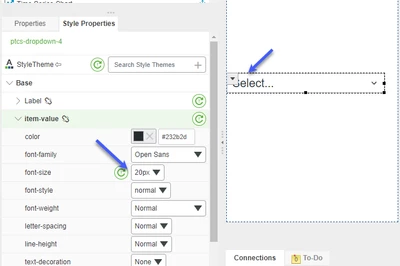


  • dropdown properties design view.png

However, this seems to only make the 'hint text' in the drop down list larger, but when I expand the drop down, all the values are still a smaller font size.
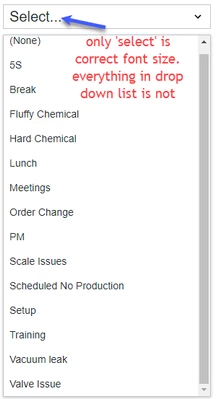
 

dropdown incorrect size.png


Am I missing something basic here? How can I increase the font-size of the selection items in the new drop down widget?


Thanks so much for your help!


Andrew
Best answer by azoorob3

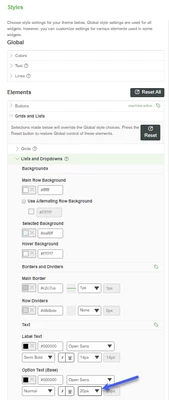
I figured it out! I needed to create a new 'style theme' and in the 'Lists and Dropdowns -> Text' section, I increased the 'Option Text (base)' property which fixed it for me. 


sytle theme.png

1 reply

azoorob313-AquamarineAuthorAnswer
13-Aquamarine
December 5, 2019

I figured it out! I needed to create a new 'style theme' and in the 'Lists and Dropdowns -> Text' section, I increased the 'Option Text (base)' property which fixed it for me. 


sytle theme.png