
1-Visitor
December 18, 2018
Question

Key Pressed Event(F11)

  • December 18, 2018
  • 3 replies
  • 1775 views

Hi All,


We want to enable and disable F11 key pressed event by clicking a button from Mashup.

We have deployed our mashup in a production monitor(kiosk) like the following image. process-monitoring.jpg
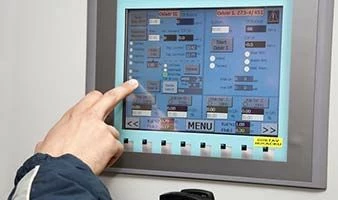
 

Here we don't have the keyboard attached to it to enable/disable F11 for full-screen mode. So we are looking for enabling and disabling it via a button click.

Give us a solution for this.


The solution to enable FullScreen

($("#runtime")[0].webkitRequestFullScreen()?$("#runtime")[0].webkitRequestFullScreen():($("#runtime")[0].mozRequestFullScreen()?$("#runtime")[0].mozRequestFullScreen():$("#runtime")[0].msRequestFullscreen()?$("#runtime")[0].msRequestFullscreen():$("#runtime")[0].requestFullScreen()))

--by @CarlesColl.


looking for disabling the full screen.


3 replies

1-Visitor
December 18, 2018

Here you have a possible solution (but it's client side): https://productforums.google.com/forum/#!msg/chrome/ndKT1iyTaZQ/01yEVTtTAwAJ


If previous doesn't works, google for: "keyboard less browser exit full screen mode" 😉


Regards.

Support
December 31, 2018

Hi @Janakiraman.


If the response from @CarlesColl helped to solve your issue, please mark it as the Accepted Solution for the benefit of others with the same issue.  If you found a solution not posted here, please feel free to post it and mark that as the Accepted Solution.


Thank you for using our Community!


Regards.


--Sharon

1-Visitor
January 2, 2019

Hi Sharon,


We did not find any solution for releasing(deactivate) the full-screen mashup yet, instead, we have satisfied our customer with a different solution for releasing the full-screen mashup.

Anyhow Thanks for your wonderful support in this.

Credits to  @CarlesColl.


Regards,


Janakiraman P