
1-Visitor
October 18, 2019
Question

Label chart y axis label issue

  • October 18, 2019
  • 1 reply
  • 2166 views

Hi,

I have created a sevice which validates the result based on input. eg: if input date i empty, it brings data for past 10 days. If input date is selected, it brings data for that selected date. I have binded this output to the chart. 


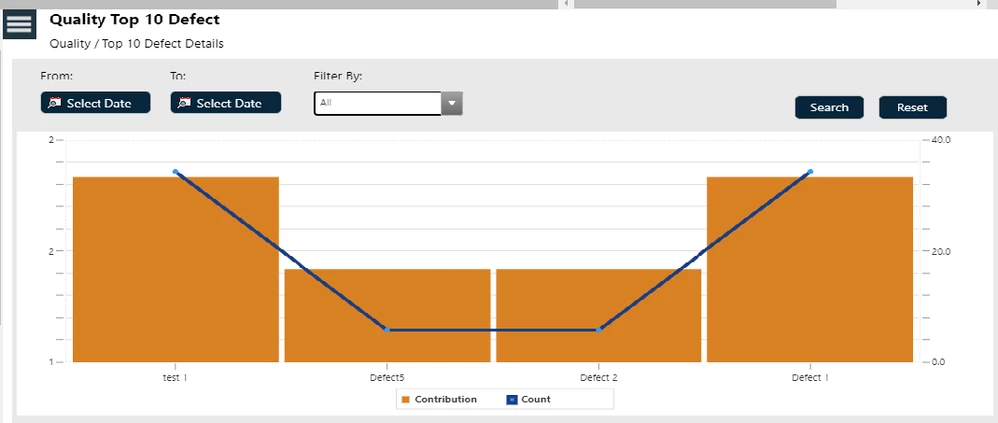
When the mashup is loaded, the y axis labels shows wrongs, (0 , 2 , 2) the value repeats twice. But when I select the date it shows properly. I have given auto scale of y axis. 


How can I resolve this issue?
yaxislabelissue.png

Thanks,

Shalini V.

1 reply

5-Regular Member
October 21, 2019

You may want to check your YaxisFormat property in the widget. 


The number should be 1, 1.5, 2, while the 1.5 is rounded to 2 as your format might be Integer.

1-Visitor
October 23, 2019

Hi,

I have kept my y axis format as 0000.Because in y axis, We are showing the production count and it cant be 0. 

How can I resolve this issue and I want it to appear as 0,1,2..


Thanks,

Shalini V.

5-Regular Member
October 24, 2019

So your COUNT property values are all integers? 


Enable the YAxisZeroScale might work. Your chart starts from 1.