10-Marble
November 4, 2024
Solved

Line chart

  • November 4, 2024
  • 3 replies
  • 1795 views

Hi,


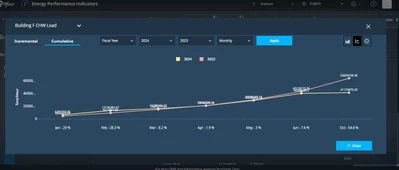
Observing overlapping of values in Line chart like below in Thingworx 9.3.0:
 

krishnakomal211_0-1730726727137.png

Please suggest if there is any way to avoid this by adjusting anything in chart properties.

Best answer by TonyZhang

Hi @krishnakomal211,

You can enable LegendFilter property to achieve allowing users to hide/display entire series through checkbox.

Alternatively, you can enable vertical zoom to allow users to zoom in vertically to take a closer look at some data points.

Also maybe try configuring SeriesStacking?

3 replies

10-Marble
November 5, 2024

Request to please check and respond back

16-Pearl
November 6, 2024

not quite sure. What you can do as workaround is not to show the value in the line chart. so they are only shown when the user hovers over the points. there is a config option for this (not sure of the name).

10-Marble
November 7, 2024

I can see HideValues property but It will completely hide values which is not desired.


Checked ValuesPosition property which helps whether to display values above,below or overlapped on line.


But I want ValuesPosition not for complete chart but for each Data series so that For one of the series I can select Above and for the other I can select below for better visibility of both values.Can you suggest any option or css for the same

18-Opal
November 7, 2024

That won't work, because your lines cross, even on your own screenshot. So you won't be able to say that for example the yellow line should always display the values above, and the red one -- below, because this would make sense only for the left half of this chart. You need to find a better idea.

16-Pearl
November 21, 2024

Hi @krishnakomal211,

It appears that a response to this post answers your question.  For the benefit of other Community Members who may have the same question, it would be great if you could designate an appropriate reply as the Accepted Solution.

In the event that this response did not answer your question, please post your current status so that we can continue to support.

Thanks for using the PTC Community!

Regards,