pshashipreetham
18-Opal
18-Opal
April 11, 2022
Solved

Line chart without Datashape

  • April 11, 2022
  • 2 replies
  • 2385 views

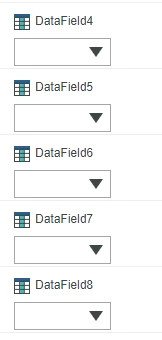
There is use case, where Line chart need to be populated based on the INFOTABLE output only, without any Datashape, as known, Without Datashape DataFields in the Line chart can't be selected and data will not be visible on the Mashup.
psp316r_0-1649683693688.png
is there any way, where datashape is not required to populate the data in the Line chart  ?
Thingworx version: 9.3


@c_lowy @slangley @CarlesColl @paic @VladimirN 

Thanks,
Shashi.

Best answer by pshashipreetham

Found the solution, 

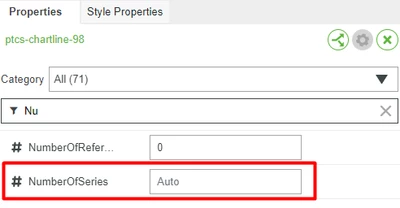
So Line chart can populate without using a DataShape with the following Widget Configuration:

Shashi_Preetham_0-1657909995025.png

  1. Create a Service(in my case, based on the inputs given, the Output Infotable Columns/Fileds varies from 3-10)
  2. The output of the service should be an InfoTable without any DataShape
  3. Connect the service to the line chart, and it automatically populates the Data
  4. If the Legend Filter is enabled, then Legend Filters are also populated

Thingworx version: 9.3.2

Note: Max Number of fields that the line chart can populate is 24 or 25

Thanks,
Shashi.

2 replies

15-Moonstone
April 14, 2022

To my knowledge this isn't possible. What is the use case here? Isn't it possible to just map the dynamic data to an generic data shape? So you can set a column for each data field which may or may not contains data.

pshashipreetham
18-Opal
18-Opal
April 16, 2022

Hi @DanZ ,


The Number of Data Fields will be less or more sometime, therefore need without the datashape.

Thanks,
Shashi.

15-Moonstone
April 25, 2022

The chart widget supports max 8(?) data fields/columns, so you are limited by that. I would create a service that will be bound to the chart widget. This service has a infotable result with a generic 8 columns datashape (and any other informations that you need). This services retrieves the actual data and populates at least one or all eight of the columns.


I admit, I do not know how the chart widget handles empty data fields. Best case: They just aren't displayed.

pshashipreetham
18-Opal
pshashipreetham18-OpalAuthorAnswer
18-Opal
July 15, 2022

Found the solution, 

So Line chart can populate without using a DataShape with the following Widget Configuration:

Shashi_Preetham_0-1657909995025.png

  1. Create a Service(in my case, based on the inputs given, the Output Infotable Columns/Fileds varies from 3-10)
  2. The output of the service should be an InfoTable without any DataShape
  3. Connect the service to the line chart, and it automatically populates the Data
  4. If the Legend Filter is enabled, then Legend Filters are also populated

Thingworx version: 9.3.2

Note: Max Number of fields that the line chart can populate is 24 or 25

Thanks,
Shashi.

5-Regular Member
December 6, 2023

Hi how do You select x field ? All my variables are numéric i'm not sure how to select the x field without datashape