14-Alexandrite
May 24, 2022
Solved

Line Chart - Zoom Reset

  • May 24, 2022
  • 1 reply
  • 2019 views

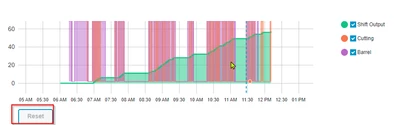
Hello. When i enable zoom in the Line chart, the "Reset" button shows up by default. is there a way to not have the reset button and use an external button for resetting the zoom?

LP_10027711_0-1653409213285.png


Best answer by TonyZhang

Hi @LP_10027711,


I'm curious why you want to use a custom reset button instead of the default one.

You can use LabelReset property of the Line Chart to change the default text if you want by the way.


From the graph looks like you enabled DragSelectionZoom (no slider, no range selection). I tried it in 9.3.0 and could use below custom CSS to not display the reset button (whether the custom css works may differ from TWX version and browser)


ptcs-chart-line::part(zoom-xaxis){
    display: none;
}
 

Then you can create a button widget on your own, bind the Clicked event to ResetToDefaultValue service of the Line Chart should to do the reset trick.

1 reply

TonyZhang16-PearlAnswer
16-Pearl
May 26, 2022

Hi @LP_10027711,


I'm curious why you want to use a custom reset button instead of the default one.

You can use LabelReset property of the Line Chart to change the default text if you want by the way.


From the graph looks like you enabled DragSelectionZoom (no slider, no range selection). I tried it in 9.3.0 and could use below custom CSS to not display the reset button (whether the custom css works may differ from TWX version and browser)


ptcs-chart-line::part(zoom-xaxis){
    display: none;
}
 

Then you can create a button widget on your own, bind the Clicked event to ResetToDefaultValue service of the Line Chart should to do the reset trick.

14-Alexandrite
May 26, 2022

This worked perfectly!! thank you!