
14-Alexandrite
July 29, 2024
Solved

LineAreaChart fill-opacity

  • July 29, 2024
  • 1 reply
  • 844 views

Hi folks,

I have a problem with my 'Line Area Chart' in TWX 9.5.3.


My selected colors of the 'Style Properties' are overwritten by 'fill-opacity: 0.5' from the element ':host([stacked]) [part~=“area”]'.

The “style properties” of the series all have an opacity of 100% so that the colors are fully displayed. However, this has no influence on the pale color displayed.


How can I overwrite this wrong value with 'fill-opacity: 1' with css?
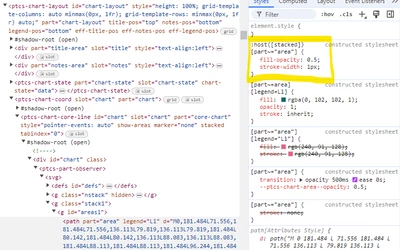
 

Elements_DevTools.png


Best regards

Marc

Best answer by M4RC

Hello @PEHOWE,

thank you for your reply.


I contacted PTC support after some time, as the question was asked four months ago. They were able to help me with the following snipped:

@supports (ptcs-style-unit: "PTCS-CHART-CORE-LINE"){
 :host([stacked]) [part~="area"] {
 		fill-opacity: 1 !important;
	}
}


Best regards

Marc

1 reply

17-Peridot
December 2, 2024

Hello @M4RC ,
Do you happen to have a simple test case you can export as XML and attach to the Community Post?
Have you tried to edit the desired values in the Developer Tools? Did that work?
Regards,
Pehowe

M4RC14-AlexandriteAuthorAnswer
14-Alexandrite
December 3, 2024

Hello @PEHOWE,

thank you for your reply.


I contacted PTC support after some time, as the question was asked four months ago. They were able to help me with the following snipped:

@supports (ptcs-style-unit: "PTCS-CHART-CORE-LINE"){
 :host([stacked]) [part~="area"] {
 		fill-opacity: 1 !important;
	}
}


Best regards

Marc