
1-Visitor
October 14, 2019
Solved

Log in ThingWorx Runtime

  • October 14, 2019
  • 2 replies
  • 1434 views

Hi there,


I am using the host free for 30 days.


I have created one dashboard and one user.


I was able to open this dashboard in other devide (tablet). To do it I copied the runtime's link and shared with my tablet.


When I opened the link was requested access credentials and the first time I missed the login and I was able to observe that no message was showed saying for example: "user or password incorrect".


Is there any way to change the login screen?
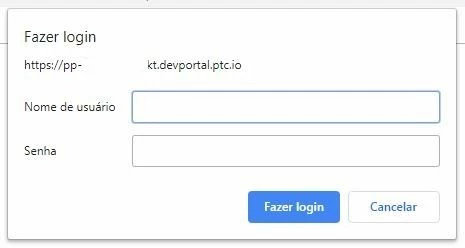
 

login.JPG


Regards,

Leonardo.

Best answer by PaiChung

One of the easiest ways to get a nicer login  screen and interaction is to use an Organization and the FormLogin

<server>/Thingworx/FormLogin/NameOfOrganization

http://support.ptc.com/help/thingworx_hc/thingworx_8_hc/en/index.html#page/ThingWorx%2FHelp%2FComposer%2FSecurity%2FOrganizations%2FOrganizations.html


Please do note the impact on visibility, which you can 'turn off' by adding the 'Users' user group to your Org.

2 replies

PaiChung22-Sapphire IAnswer
22-Sapphire I
October 14, 2019

One of the easiest ways to get a nicer login  screen and interaction is to use an Organization and the FormLogin

<server>/Thingworx/FormLogin/NameOfOrganization

http://support.ptc.com/help/thingworx_hc/thingworx_8_hc/en/index.html#page/ThingWorx%2FHelp%2FComposer%2FSecurity%2FOrganizations%2FOrganizations.html


Please do note the impact on visibility, which you can 'turn off' by adding the 'Users' user group to your Org.

einsfele1-VisitorAuthor
1-Visitor
October 16, 2019

Hi @PaiChung 


Thanks for your answer.


It helped me a lot.


Regards,

Leonardo