
16-Pearl
May 24, 2023
Solved

Mail Extension not not sending mails

  • May 24, 2023
  • 1 reply
  • 2120 views

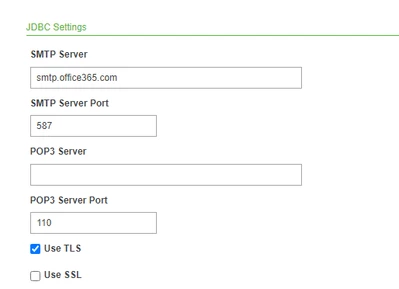
Mail Extension was working fine`in thingworx server. Recently the server is upgraded to Ad-SSO. Now iam receiving the following error while sending mail. Kindly check and let me know what changes need to be done. 
AP_10343008_0-1684968006230.png


Error1: Error sending email due to [535 5.7.139 Authentication unsuccessful, basic authentication is disabled. [CH0PR03CA0269.namprd03.prod.outlook.com 2023-05-24T22:00:45.009Z 08DB5C453072A169]_].The last server response was [535 5.7.139 Authentication unsuccessful, basic authentication is disabled. [CH0PR03CA0269.namprd03.prod.outlook.com 2023-05-24T22:00:45.009Z 08DB5C453072A169]_] with return code [535].The error originated on host xxxxx.

Error2: Error sending email due to [Could not connect to SMTP host: smtp.office365.com, port: 587].The last server response was [null] with return code [0].The error originated on host 

Best answer by AP_10343008

Once the server is upgraded with ADSSO, it is not accepting outlook domain name, username and password. So we changed SMTP Server from outlook domain to client domain.

1 reply

16-Pearl
May 25, 2023

I can just give some more context to the issue:

- Error you receive is "basic authentication is disabled". Seems like the MailExtension wants to use Basic Authentication, but your mail server has this disabled

- There was this thread some time ago regarding "basic authentication" https://community.ptc.com/t5/ThingWorx-Developers/Mail-extension-with-modern-authentication-type/m-p/826729#M59808 Theres also a PTC article reference which might help "SMTP Password Auth may be automatically disabled if MSFT detects you are not currently using SMTP Auth. But it can be enabled using a Exchange Online PowerShell Script"

Maybe it helps.

16-Pearl
May 30, 2023

In configuration, we changed SMTP Server from outlook domain to client domain. And added their mail username and password in configuration.

16-Pearl
May 31, 2023

I see. You tried before without any credentials? In this case you resolved the issue by using correct smpt server and providing username and password? If so you can close the topic with your answer as solution I guess 😉