
1-Visitor
April 20, 2018
Solved

monospace font in textarea widget

  • April 20, 2018
  • 2 replies
  • 3334 views

Hello,

I'm using ThingWorx 8.2 and in a meshup I defined a textarea that should use monospace font (ie: Courier).


So in "New Composer" I set textarea's CustomClass=abFont and in Custom CSS I defined:

.abFont {
    font-family: Courier !important;
}


However when I save and preview the meshup I see that abFont is applied to the outer bounding-box.


The font information is however overrided between such outer bounding-box and the inner textarea where the font is supposed to be monospaced...
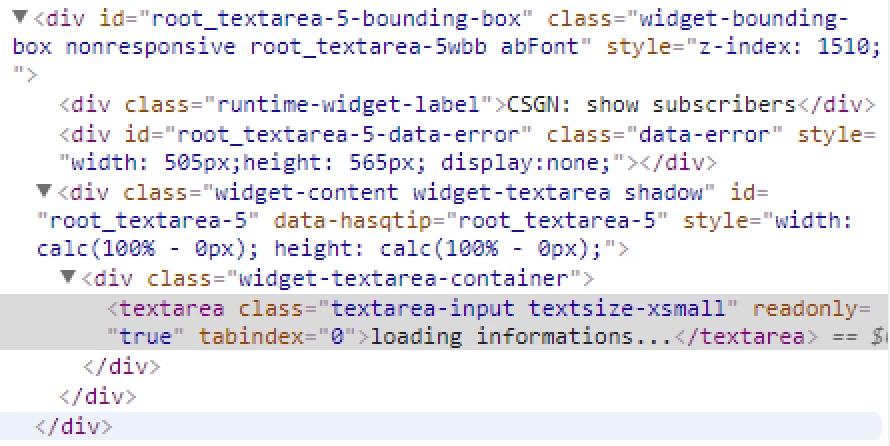
 

Screen Shot 2018-04-20 at 09.26.31.png


How can I fix this ?


Thank you,

A.

Best answer by Rick-Stanley

Thanks for including the page source with your question, that really helps.


Have you seen this guide to CSS:Style UI with CSS>Apply Custom Class to Widget


I think you need to add

.widget-textarea textarea

to your class, making your class look like this

.abFont .widget-textarea textarea {
 font-family: Courier;
}

I don't think the !important does anything


2 replies

5-Regular Member
April 20, 2018

Thanks for including the page source with your question, that really helps.


Have you seen this guide to CSS:Style UI with CSS>Apply Custom Class to Widget


I think you need to add

.widget-textarea textarea

to your class, making your class look like this

.abFont .widget-textarea textarea {
 font-family: Courier;
}

I don't think the !important does anything


abuzzi1-VisitorAuthor
1-Visitor
April 21, 2018

Hello alsmith,


what you say does really make sense and even more important.. it works!


Thank you so much,

Andrea