
1-Visitor
December 15, 2020
Solved

MQTT Thing - Unauthorized to set Password

  • December 15, 2020
  • 3 replies
  • 70775 views

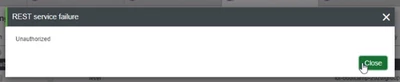
Created a MQTT Thing. In the configuration tab i was able to change the user and the URL but when I try to change the PW I get the following error:
otluk_0-1608054539352.png

What additional rights does the user (who created the the MQTT thing) need to be able to set the correct password to be able to establish a connection to the MQTT Broker?


Thanks for any hints that helps to solve that issue 🙂


ThingWorx Version 9.0

MQTT Extension from here: https://support.ptc.com/appserver/auth/it/esd/product.jsp?prodFamily=TWX 

Best answer by otluk

PTC Support Team run a test with the MQTT extension and  was able to get to the same error as you got, so hopefully the underlying error will be the same. Could you please perform the following:

  • As Administrator , log into Composer - Access Resources > EncryptionServices > Permissions > Run Time
  • In the Property, Service, or Event Overrides field search for service EncryptPropertyValue
  • Grant the execute permission to the user or group you want
  • Save the entity.


Then try again changing the password with the standard user.


Should you still get an error, I would advise you check the /logs/ApplicationLog.log file as it should have some relevant error about what permission is missing, for example: “Not authorized for ServiceInvoke on EncryptPropertyValue in EncryptionServices” Thank you Sincerely, Christophe (From PTC Support Team)


Thank you @slangley for opening the ticket. 🙂

3 replies

16-Pearl
December 15, 2020

Please follow below steps using Administrator user and let me know if you still get the same error,
1)Login to Composer
2)Go to System -> Resources
3)Click on CollectionFunctions Resource
4)Execute AddCollectionRunTimePermission service with below parameters
collectionName - ThingPackages
type - ServiceInvoke
resource - * (all)
principal - <User or Group Name>
principalType - User / Group
Allow - True

otluk1-VisitorAuthor
1-Visitor
December 16, 2020

Thank you! 🙂 When I am executing this (as Administrator):

otluk_0-1608111127317.png

I still get the same error for the user, who is member of the Group. What am I missing?

16-Pearl
December 16, 2020

You have provided wrong input in principal. You need to enter the name of the user or the user group to whom you want to assign the permissions.

16-Pearl
December 18, 2020

Hello @otluk 


If the previous response answered your question, please mark it as the Accepted Solution for the benefit of others with the same question.  If you still have issues, please let us know.


Thanks

Om Dukiya

otluk1-VisitorAuthor
1-Visitor
December 18, 2020

The answer did not yet solve the issue. Still the new MQTT Thing can not connect to the MQTT Broker. The MQTT Thing created by the Admin can and a duplicate of the MQTT Thing created by the Admin can. But the idea of course is that a User can add MQTT Things as this just makes more sense.

otluk1-VisitorAuthorAnswer
1-Visitor
January 12, 2021

PTC Support Team run a test with the MQTT extension and  was able to get to the same error as you got, so hopefully the underlying error will be the same. Could you please perform the following:

  • As Administrator , log into Composer - Access Resources > EncryptionServices > Permissions > Run Time
  • In the Property, Service, or Event Overrides field search for service EncryptPropertyValue
  • Grant the execute permission to the user or group you want
  • Save the entity.


Then try again changing the password with the standard user.


Should you still get an error, I would advise you check the /logs/ApplicationLog.log file as it should have some relevant error about what permission is missing, for example: “Not authorized for ServiceInvoke on EncryptPropertyValue in EncryptionServices” Thank you Sincerely, Christophe (From PTC Support Team)


Thank you @slangley for opening the ticket. 🙂