

1-Visitor
November 14, 2019
Question

Need to create HTML like form using thingworx.

  • November 14, 2019
  • 9 replies
  • 4861 views

Hi,


I have created the MENU which has 5 mashups in it.  In this one of the mashup is like HTML form as shown in snapshot below.
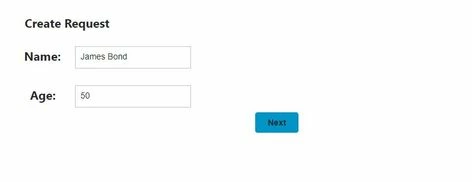
 first.JPG


On the press of "Next" button , it should load the "Review Details" mashup as below.
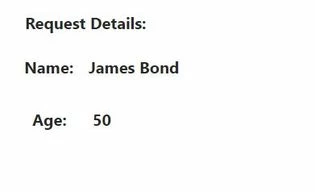
second.JPG

I am not able to load another mashup on "Next" button clicked event.

Please let me know if anyone know how to load mashup on button clicked event. Also how to get the data entered in the Form.

9 replies

16-Pearl
November 15, 2019

Hello cgoma,


I believe the functionality you are looking for with respect to the Next button can be found via the Navigation Widget. This is similar in appearance to a Button Widget but has navigational functionality.


More information on this widget can be found here.

cgoma1-VisitorAuthor
1-Visitor
November 15, 2019

@tmisner 


Thanks for your reply.

I am able to navigate to mashup using "Navigation" widget.

As you can see the snapshot which I had attached earlier had input text box for "Name" and "Age" field.

Actually I wanted to show "Name" and "Age" entered in first mashup into the mashup which is loaded after clicking navigation button.

16-Pearl
November 15, 2019

What you are asking for can be accomplished with the use of Mashup Parameters. Essentially on the second Mashup that will load after a user presses Next you create two Mashup Parameters, one for Name and one for Age. You then bind these to a Label Widget or however you want these to be displayed on the second screen. Back on the first Mashup where the user enters these values you can then bind the input text from the Text Field Widgets for Name and Age to the respective Mashup Parameters on the Navigation Widget. After choosing which Mashup the Navigation Widget links to you will see the Mashup Parameters you created as properties of the Navigation at which point you can bind the Text Fields.


I've gone ahead and created a quick example that I've attached here. You can proceed to import this into your system and confirm this matches the functionality you are discussing. The two Mashups are FirstScreenSample and SecondScreenSample. My Mashup Parameters are called entered_name and entered_age.


Let me know if you have any questions.